How to Clone Your Voice With AI in 2026

You can clone your voice with AI in under five minutes. Record one short sample, let the AI build a voice profile, then type any script and hear it in your own voice. In VEED, the clone lives inside the editor, so the voiceover lands straight on your timeline. No audio files to download or upload.
You can clone your voice with AI in under five minutes. Record one short sample, let the AI build a voice profile, then type any script and hear it in your own voice. In VEED, the clone lives inside the editor, so the voiceover lands straight on your timeline. No audio files to download or upload.
Key takeaways
- One short recording is enough to create an AI voice clone.
- VEED records your sample in the browser, so there is nothing to upload.
- From recording to a usable clone takes a few minutes.
- Your clone appears in VEED's voice list and works across every project.
- Voiceovers generate onto your timeline, ready for subtitles and branding.
What is AI voice cloning?
AI voice cloning creates a digital copy of a real voice from a short audio sample. The model learns your pitch, pace, accent, and tone, then reads any text you type in your voice. Think of it as text-to-speech where the voice is yours, not a stock actor's.
What you need before you clone your voice
Three things separate a clone that sounds like you from a robot doing an impression:
- A quiet room. Background noise gets baked into the clone.
- A decent mic. A headset or USB mic beats your laptop's built-in one.
- Your natural voice. Read the script the way you talk to a colleague, not the way you read a legal notice.
How to clone your voice with AI step by step
Here is how to clone your voice using VEED's AI voice cloning tool.
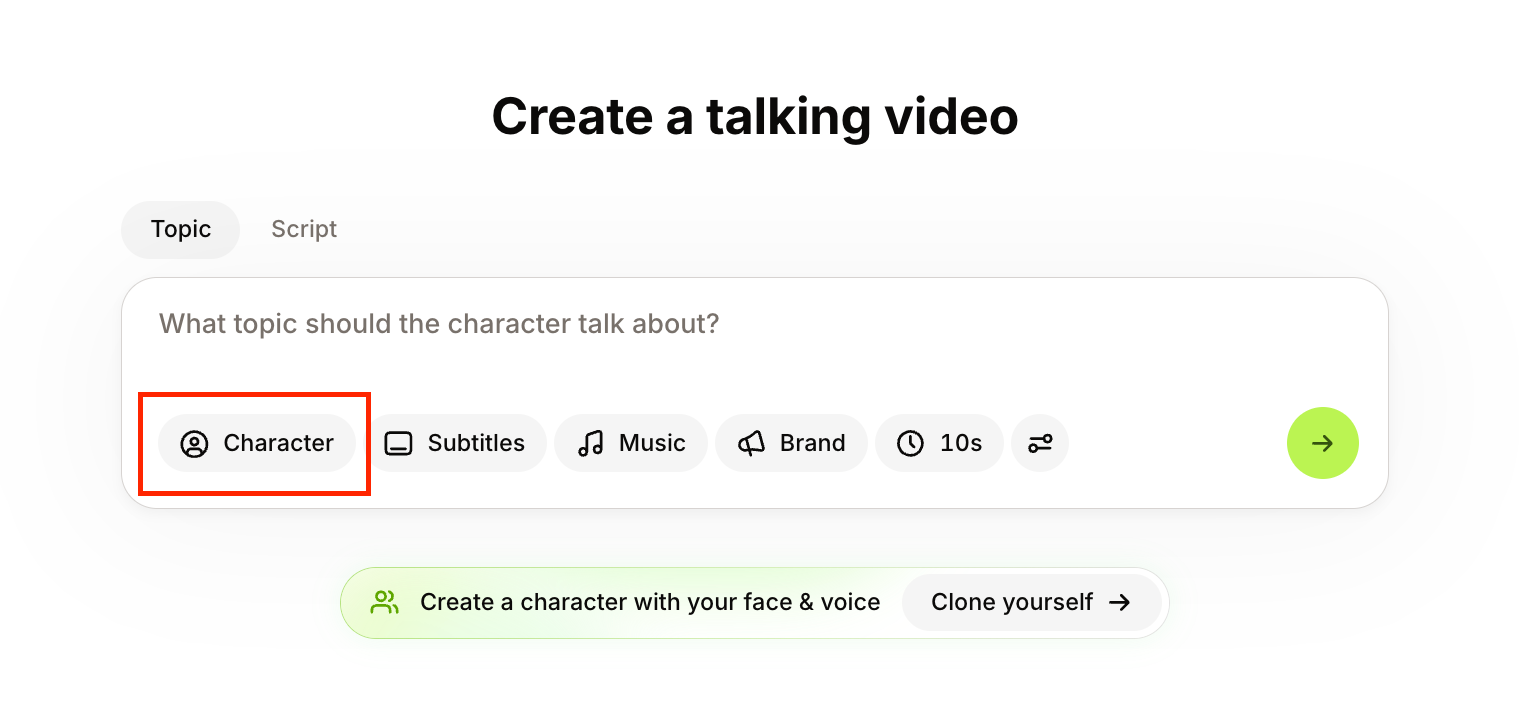
Step 1: Click Character in the prompt box
Log in to VEED. The first thing you see is the Create a talking video prompt box, the rounded field where you type what your video is about. Below the text field, click Character.
Step 2: Turn on Voice only
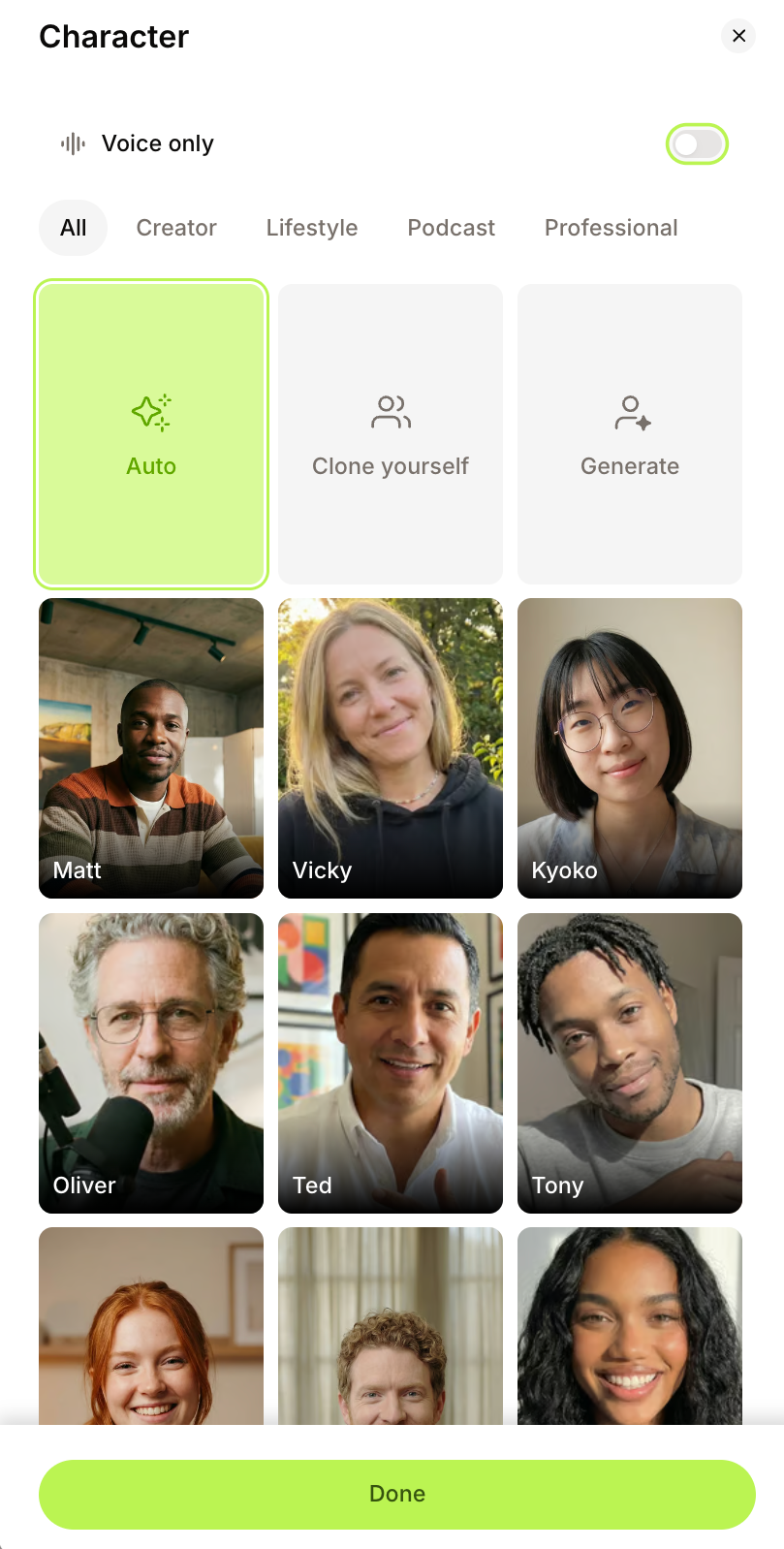
The Character panel opens with a grid of AI characters. At the top, switch on the Voice only toggle. The panel changes to a list of AI voices with filters for language, gender, age, and style.
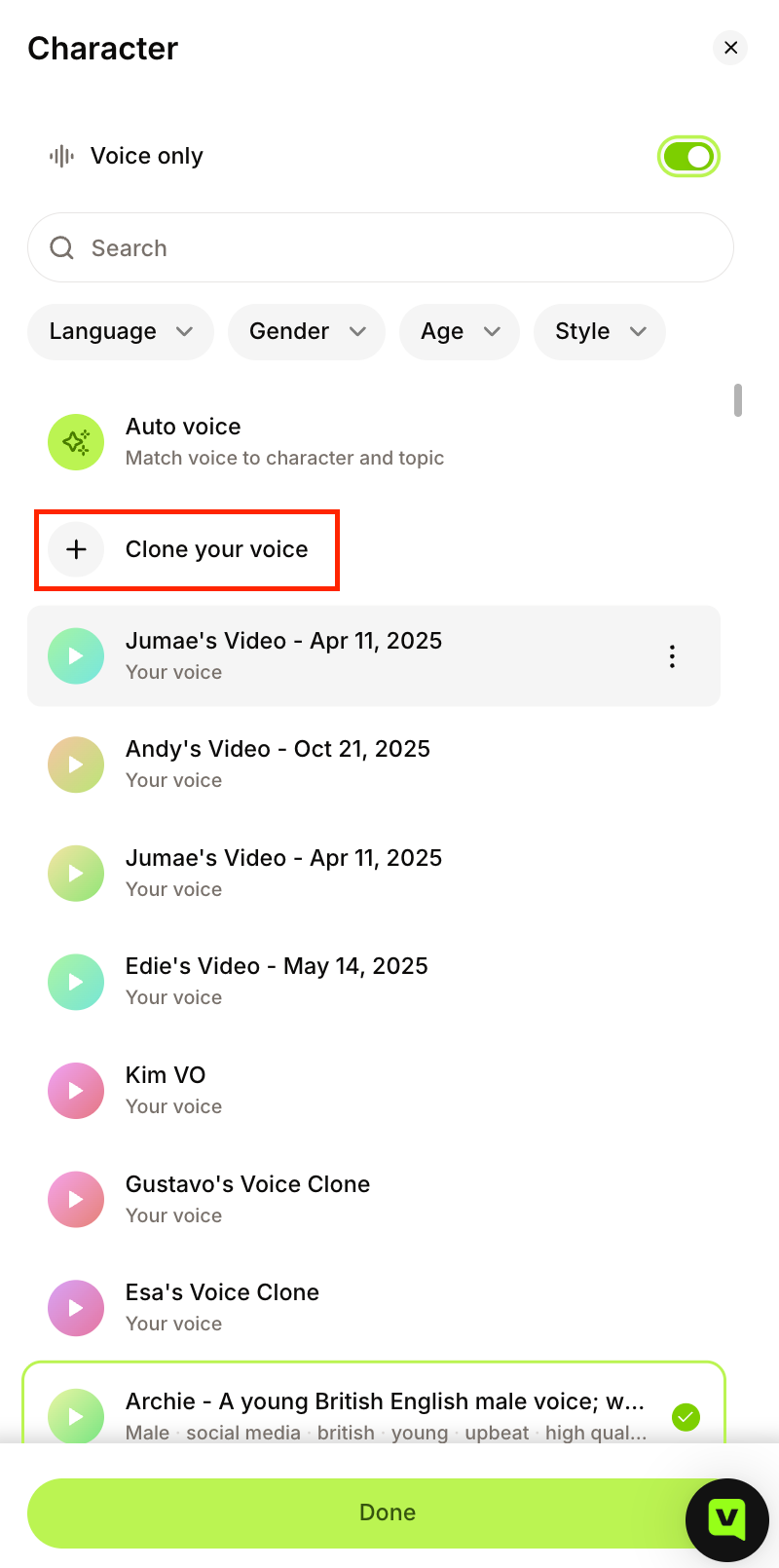
Step 3: Click Clone your voice
Select Clone your voice near the top of the list. A short script appears, with dropdowns to set your language and choose your microphone.
Extra tip: If you want more languages, pen the editor by clicking Edit Video in the left sidebar. The voice cloning tool there gives you a wider set of languages and drops the finished voiceover straight onto your timeline.
Step 4: Read the script aloud
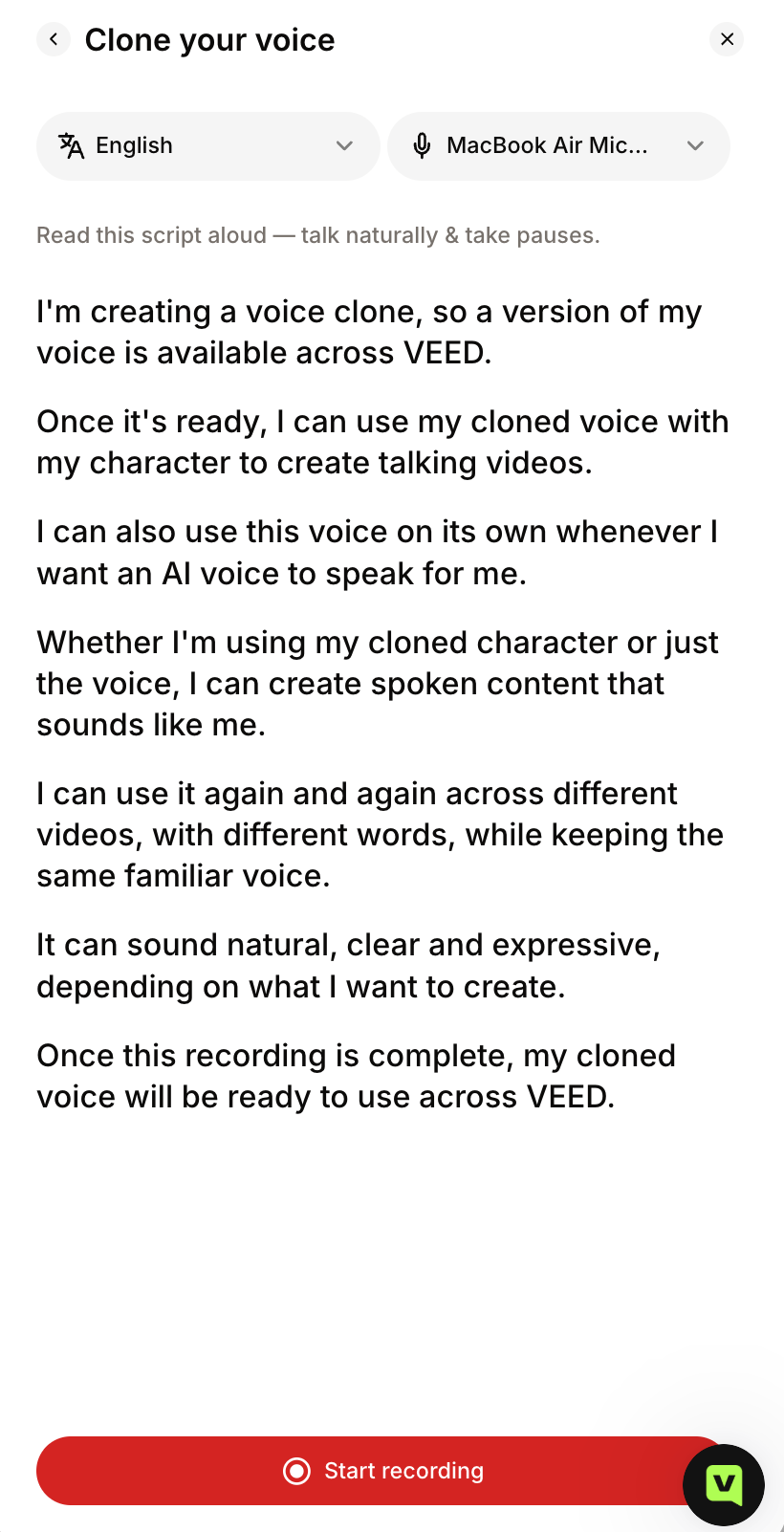
Find a quiet spot, pick your mic, and click Start recording. Read the script at your normal pace, talk naturally, and pause where you would in conversation. Background noise gets baked into the clone, so a quiet room matters. The script itself has you state that you are creating a clone of your own voice, which doubles as your consent.
Step 5: Select your clone and click Done
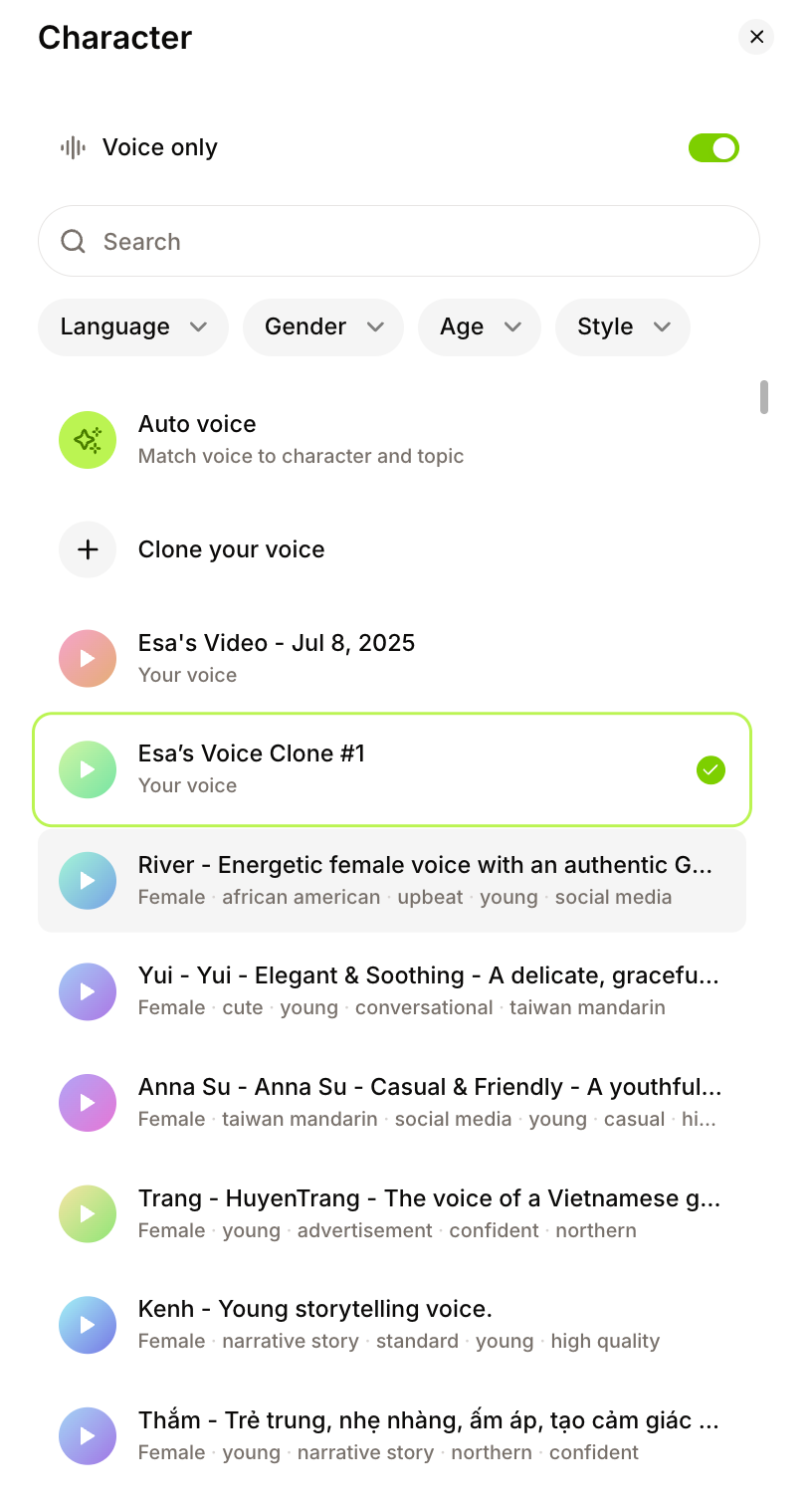
When the recording finishes, your clone appears in the voice list under Your voice, already selected. Click Done. Type a topic or script in the prompt box, and your character speaks in your voice.
VEED clones more than your voice. Back in the Character panel, Clone yourself builds a character with your face and your voice. Record once, and your character can present any new script for TikTok, Reels, YouTube Shorts, or LinkedIn, in your voice, without you getting on camera every time. It is the difference between an AI voice and an AI version of you.
How long does it take to clone a voice with AI?
Cloning your voice with AI takes under five minutes in VEED. Reading the script takes a minute or two, and processing takes moments. After that, each voiceover takes about as long as typing the script.
Can you clone your voice with AI for free?
Yes, in regions where VEED's free plan includes AI credits. Generating speech uses credits on every plan, so the free tier suits testing a short clip; regular use and longer scripts need a paid plan. Check current limits on VEED's pricing page.
Put your AI voice clone to work in video
Most voice cloning tools stop at a downloadable MP3. VEED keeps going, because your clone lives inside an AI video creation platform:
- Narrate social videos without re-recording. Change a line, regenerate, done.
- Speak other languages. Type your script in the target language and your clone reads it. Or translate an existing video in your own voice with VEED's AI dubbing tool (see how to dub a video with AI).
- Pair it with an AI avatar. Make talking-head videos with VEED's AI avatars when you cannot get on camera.
- Finish in the same tab. Run the auto subtitle generator, add your brand colors and logo, and export post-ready video that looks like your brand made it, not AI.
Record once, narrate everything
.png)
Cloning your voice with AI comes down to one short read in the browser. The payoff comes next: voiceovers that land on your timeline, speak other languages, and ship as post-ready social video with your branding on it. That is the difference between a voice clone and a content workflow.
FAQ
Open VEED, click Edit Video, go to Audio, and select Record New Clone. Read the script in the popup, then click Continue. Your clone appears in the voice list. Type a script, choose your clone, and generate a voiceover straight onto your timeline.
Less than a minute. VEED gives you a short script to read, and that single recording is enough to build your voice profile. A clean, natural read matters more than length: a quiet room and a steady pace beat five minutes of noisy audio.
Cloning your own voice is legal. Cloning someone else's without permission is not, and can break impersonation and publicity laws in many places. VEED has you read a consent script in your own voice before creating a clone, which keeps you on the right side of that line.
Yes. Type your script in the target language, select your clone, and VEED generates the voiceover in that language with your voice. One recording covers your English, Spanish, and Portuguese social channels without booking a second session at the mic.
No. ChatGPT's voice mode uses a set of preset voices and does not create a clone of your voice. To clone your own voice and use it in videos, you need a tool with a built-in voice cloning feature, such as VEED.
.png)