


Trusted by 1M+ creators
Fisheye Photo Editor
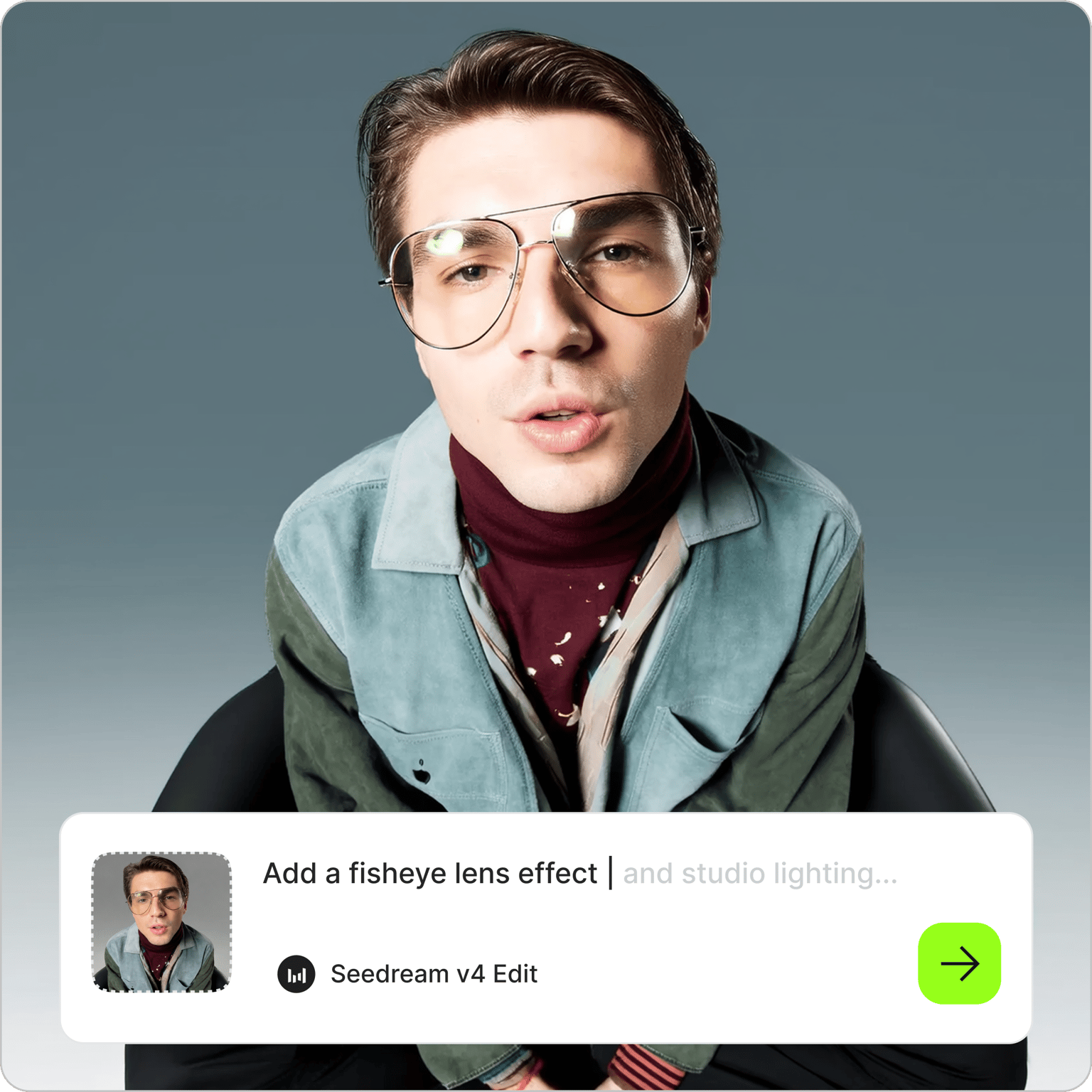
Apply a fisheye effect to any photo online. Create distorted portraits, fisheye PFPs, and fishbowl effects
No credit card required
4.6
2,100+ reviews















Add any fisheye filter to your photo
Upload any photo and describe the fisheye effect you want. The fisheye photo editor applies the filter in seconds. Apply effects like wide-angle barrel distortion, curved edges, and an enlarged center subject. Add visual interest to portraits, selfies, landscapes, and any other image. Describe the look you want, generate, and download.
How to add a fisheye effect to photo:
Step 01
Upload your photo
Upload your photo to the AI image editor. Portraits, selfies, and close-up face shots work especially well for the fisheye effect.
Step 02
Describe the fisheye look you want
Type a prompt to describe the effect. For portraits and PFPs, try prompts like 'apply fisheye lens distortion, wide-angle barrel distortion effect, exaggerated curved edges, center subject enlarged.' For landscapes or a full circular look: 'circular fisheye effect, full 180-degree sphere, subject centered in globe.'
Step 03
Download or take it further
Save your fisheye photo, or keep editing. Generate image variations, crop to a square for a PFP, animate the image, or drop it into the video editor for social content.
Learn More
Watch this Nano Banana Pro demo:
Apply any fisheye filter to photos
Most online fisheye filters give you limited presets. With our prompt-based image editor, you get to control every detail — how much the edges curve, how the center fills out, what the background looks like behind the distortion. Every edit is specific to your description, not a generic overlay applied the same way to every photo. Combine the fisheye effect with a color or background swap, all in one prompt.
Make a fisheye PFP that stands out
Fisheye PFPs have become one of the defining looks of the Y2K and lo-fi aesthetic. Barrel distortion makes portraits feel raw, candid, and shot on film. Upload your selfie, describe the distortion, and generate a profile picture that fits the look. Use the AI image variation generator to create multiple versions and pick the best one. Crop to a square for Instagram, Discord, or any other platform.
Animate your fisheye photo for social media
A static fisheye photo works for a PFP. A dynamic one stops the scroll. Use image-to-video AI to animate your fisheye image with a slow zoom into the distorted center or subtle camera motion that plays up the warped perspective. For talking head content with the fisheye aesthetic, use Fabric 1.0 to add a voice and script to your portrait. Create multiple content formats from one image.
FAQ
The fisheye effect is an extreme wide-angle distortion that curves straight lines and makes the center of the image appear enlarged while the edges bend outward. It gets its name from how a fish sees underwater — a hemispherical field of view. In photography, it's created with a specialized ultra-wide lens. With VEED’s AI fisheye photo editor, you can apply the same effect to any existing photo.
- Upload your photo to the AI fisheye photo editor.
- Describe the effect: 'apply fisheye lens distortion, wide-angle barrel distortion, exaggerated curved edges, center subject enlarged.' For a circular globe look, try: 'circular fisheye effect, full 180-degree sphere, subject centered in globe’.
- Generate and download your image.
- Upload a close-up portrait or selfie.
- Enter a prompt: 'fisheye lens distortion, barrel effect, center subject enlarged, curved edges.'
- Generate image and crop it into a square. Generate a few variations to compare different effects before choosing your final PFP.
A fishbowl effect mimics the look of a circular fisheye projection viewed through a curved glass sphere. It often crops the image into a round globe with dark borders and heavy edge compression. Standard fisheye keeps a rectangular frame but still applies strong barrel distortion across the entire image.
If you no longer have the original unedited file, you can try the AI filter remover and describe what you want corrected: 'remove fisheye distortion, straighten barrel distortion, restore natural perspective.' Results vary depending on the AI model and how heavily the effect was applied.
The fisheye photo editor runs on AI credits. Each image generation costs credits based on the AI model you select. Sign up to see what's available on your plan. Check the pricing page for more information.
Loved by creators.
Loved by the Fortune 500
“
With VEED I didn't need 15 tutorials - I jumped straight in and started editing.

Gwenne Wilcox
Founder,
Brand Brainery
“
You can go beyond choppping things. VEED actually makes my videos look great.

Michael Glover
Demand Gen Manager,
ConvertFlow
“
The first four videos i created with VEED got over 40,000 impressions on LinkedIn.

Travis Tyler
Senior Content Producer,
PandaDoc
“
I found VEED at the right time: if you're making UGC ads and not using Eye Contact Correction and Noise Reduction on VEED you're missing out on ROI.

Sebastian Schurgers
Head of Growth Marketing,
Gronda
“
With VEED I didn't need 15 tutorials - I jumped straight in and started editing.
Gwenne Wilcox
Founder,
Brand Brainery
“
You can go beyond choppping things. VEED actually makes my videos look great.
Michael Glover
Demand Gen Manager,
ConvertFlow
“
The first four videos i created with VEED got over 40,000 impressions on LinkedIn.
Travis Tyler
Senior Content Producer,
PandaDoc
“
I found VEED at the right time: if you're making UGC ads and not using Eye Contact Correction and Noise Reduction on VEED you're missing out on ROI.
Sebastian Schurgers
Head of Growth Marketing,
Gronda
“
The first four videos i created with VEED got over 40,000 impressions on LinkedIn.
Travis Tyler
Senior Content Producer,
PandaDoc
“
I found VEED at the right time: if you're making UGC ads and not using Eye Contact Correction and Noise Reduction on VEED you're missing out on ROI.
Sebastian Schurgers
Head of Growth Marketing,
Gronda
“
With VEED I didn't need 15 tutorials - I jumped straight in and started editing.
Gwenne Wilcox
Founder,
Brand Brainery
“
You can go beyond choppping things. VEED actually makes my videos look great.
Michael Glover
Demand Gen Manager,
ConvertFlow
Discover more
Explore related tools
More from VEED
Best AI Image Generators: Top Tools for Creating Stunning Visuals in 2026
From text prompts to breathtaking visuals in mere seconds, AI image generators have revolutionized the way we create digital art. Whether you're building content for social, school, or just for fun, turning ideas into visuals has never been easier. This guide breaks down the best AI image generators of 2025. You'll see what each tool does well, where it struggles, and who it’s built for, so you can pick the right one for your goals and budget.

AI Art Prompts: How to Write Better Prompts, Creative Examples, and Tools to Try
Getting your AI art prompts is the key to winning with generative AI tools. Learn how to write better prompts here.

How to Cartoonize Your Photo with AI (Step-by-Step Guide)
Learn how to cartoonize your photo using AI, and how to use ChatGPT to craft the perfect visual prompt to bring your unique style to life.
Trusted by 1M+ creators
When it comes to amazing videos, all you need is VEED
No credit card required
More than a fisheye photo editor
VEED is an AI video creation platform where you can generate, enhance, and export videos. Starting from an image? Beyond fisheye effects, the AI image editor handles style transfers, background swaps, color edits, and more. Take your images further with AI animation. Generate images, animate them, or drop them into a video project in our editor. Turn your ideas into post-ready videos in minutes. Sign up now to start creating.