


Trusted by 1M+ creators
Curly Hair Filter
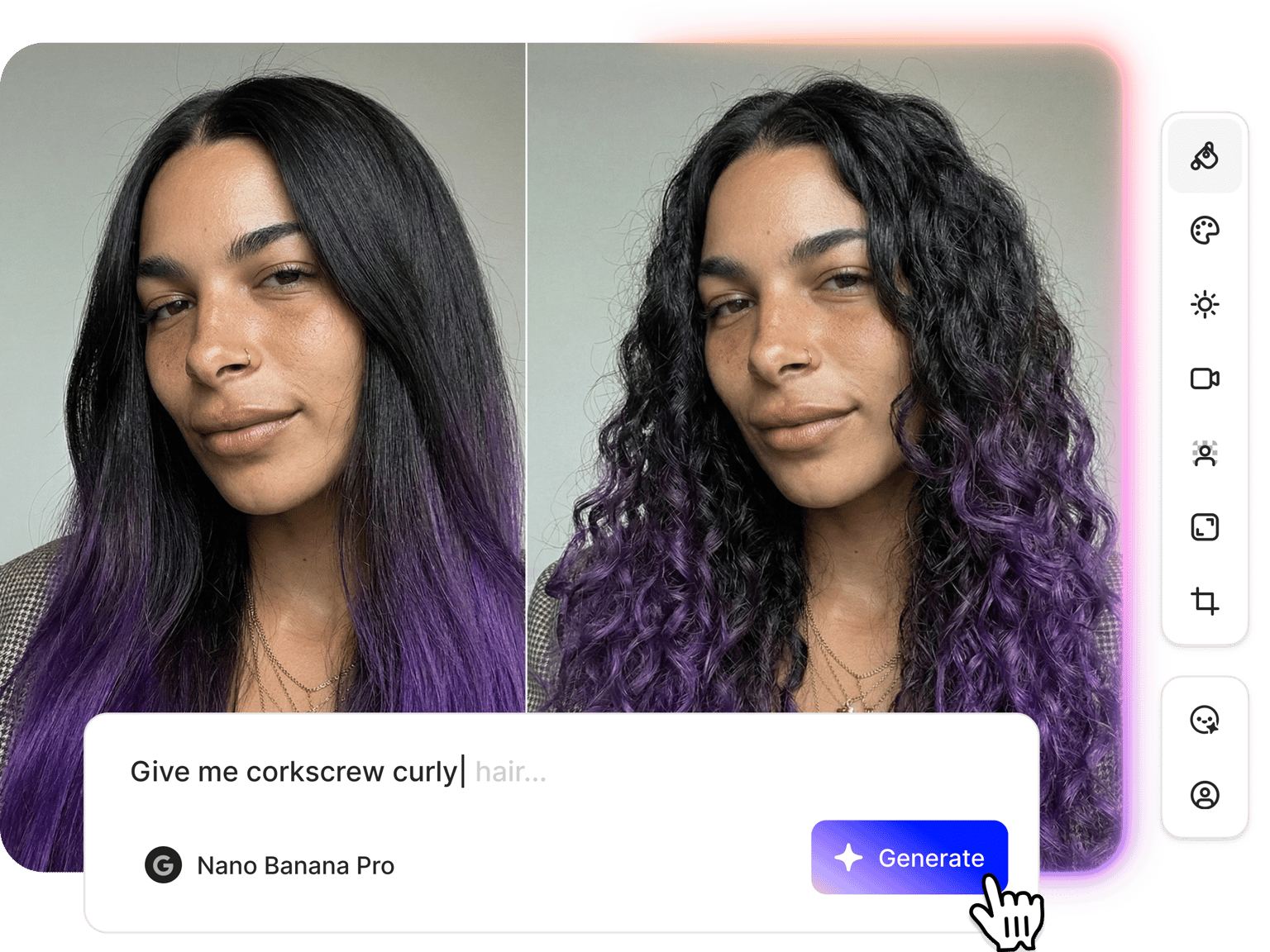
Add curly hair to your photo with AI. Try loose waves, tight coils, or voluminous curls
No credit card required
4.6
2,100+ reviews















See how you'd look with curly hair
Upload your photo and try on curly hairstyles using our curly hair filter. Describe the curly hair you want: loose beach waves, tight coils, or voluminous curls. VEED's curly hair filter applies the look to your photo, then lets you view it from multiple angles using camera angle controls. Simply select a camera angle or include it in your prompt. Try our curly hair filter now. No need to download an app.
How to use the curly hair filter:
Step 01
Upload your photo
Upload a clear photo to the curly hair simulator. Front-facing portraits with good lighting work best.
Step 02
Describe the hairstyle you want
Type a prompt: loose beach waves, tight natural coils, or curly hair with volume at the crown. You can also add a color change in the same prompt.
Step 03
Download image or turn it into a video
Save your curly hair photo or take it further. Animate your new look with image-to-video AI or bring it into a full video project.
Learn More
Watch this Nano Banana Pro demo:
Curly hair filter with prompt-based edits
Describe the curly hair you want, and VEED applies it to your photo. Adjust the hair color in the same prompt. The curly hair editor gives you more than just presets. Type prompts in plain language, specifying texture, color, and length. The AI hairstyle changer offers more styles beyond curly hair. Generate variations and compare until you find the perfect look.
Curly hair AI that shows every angle
When you're visualizing a new hairstyle, a single front-facing shot isn’t enough. VEED's curly hair generator lets you see how you’d look from multiple angles. Select camera angle presets or type a prompt to see a side profile, back view, or three-quarter shot — useful for seeing how curls frame your face or fall at the back.
Style your image, then bring it to video
VEED gives you more than a curly hair filter. Apply new hairstyles to profile photos, and scale your social content with AI lip sync. You can create talking head videos in your voice using Fabric 1.0. Or use image-to-video AI to animate your photo. Create social content, build a brand persona, or develop a character look.
FAQ
Use VEED’s curly hair filter online to try curly hair on your face. Upload your photo and describe the curl style you want. Generate the image and use camera angle controls to see how the curls look from the side or back. Select advanced models, such as Nano Banana, for realistic hairstyle changes.
You can try any curly hairstyle, including:
- Loose beach waves
- Tight coils
- Voluminous curls
- Wavy bobs Combine with a color change in the same prompt using the AI hair color changer to see a full transformation.
Many hair filter apps offer a fixed menu of presets. VEED lets you type plain-language prompts to apply curly hair to your photo, giving you more flexibility. You can also:
- Check multiple camera angles
- Animate the image for social media content
- Bring it into a video project
VEED uses a credit-based system for AI filters. Each image generation costs credits based on the AI model you use. Subscribe to a paid plan with AI credit add-ons to access AI filters and more content creation tools. Check our pricing page for more information.
Loved by creators.
Loved by the Fortune 500
“
With VEED I didn't need 15 tutorials - I jumped straight in and started editing.

Gwenne Wilcox
Founder,
Brand Brainery
“
You can go beyond choppping things. VEED actually makes my videos look great.

Michael Glover
Demand Gen Manager,
ConvertFlow
“
The first four videos i created with VEED got over 40,000 impressions on LinkedIn.

Travis Tyler
Senior Content Producer,
PandaDoc
“
I found VEED at the right time: if you're making UGC ads and not using Eye Contact Correction and Noise Reduction on VEED you're missing out on ROI.

Sebastian Schurgers
Head of Growth Marketing,
Gronda
“
With VEED I didn't need 15 tutorials - I jumped straight in and started editing.
Gwenne Wilcox
Founder,
Brand Brainery
“
You can go beyond choppping things. VEED actually makes my videos look great.
Michael Glover
Demand Gen Manager,
ConvertFlow
“
The first four videos i created with VEED got over 40,000 impressions on LinkedIn.
Travis Tyler
Senior Content Producer,
PandaDoc
“
I found VEED at the right time: if you're making UGC ads and not using Eye Contact Correction and Noise Reduction on VEED you're missing out on ROI.
Sebastian Schurgers
Head of Growth Marketing,
Gronda
“
The first four videos i created with VEED got over 40,000 impressions on LinkedIn.
Travis Tyler
Senior Content Producer,
PandaDoc
“
I found VEED at the right time: if you're making UGC ads and not using Eye Contact Correction and Noise Reduction on VEED you're missing out on ROI.
Sebastian Schurgers
Head of Growth Marketing,
Gronda
“
With VEED I didn't need 15 tutorials - I jumped straight in and started editing.
Gwenne Wilcox
Founder,
Brand Brainery
“
You can go beyond choppping things. VEED actually makes my videos look great.
Michael Glover
Demand Gen Manager,
ConvertFlow
Discover more
Explore related tools
More from VEED
Best AI Image Generators: Top Tools for Creating Stunning Visuals in 2026
From text prompts to breathtaking visuals in mere seconds, AI image generators have revolutionized the way we create digital art. Whether you're building content for social, school, or just for fun, turning ideas into visuals has never been easier. This guide breaks down the best AI image generators of 2025. You'll see what each tool does well, where it struggles, and who it’s built for, so you can pick the right one for your goals and budget.

AI Art Prompts: How to Write Better Prompts, Creative Examples, and Tools to Try
Getting your AI art prompts is the key to winning with generative AI tools. Learn how to write better prompts here.

How to Cartoonize Your Photo with AI (Step-by-Step Guide)
Learn how to cartoonize your photo using AI, and how to use ChatGPT to craft the perfect visual prompt to bring your unique style to life.
Trusted by 1M+ creators
When it comes to amazing videos, all you need is VEED
No credit card required
More than a curly hair filter
VEED gives you a full creative toolkit, from hair filters to video editing tools. Add curly hair to a photo, check it from every angle with the curly hair simulator, adjust the color, and animate the image or drop it into a video project. The full image editor handles background changes, relighting, facial expression edits, and more. You get everything in one platform. Start creating with VEED now.