


Trusted by 1M+ creators
AI Style Transfer
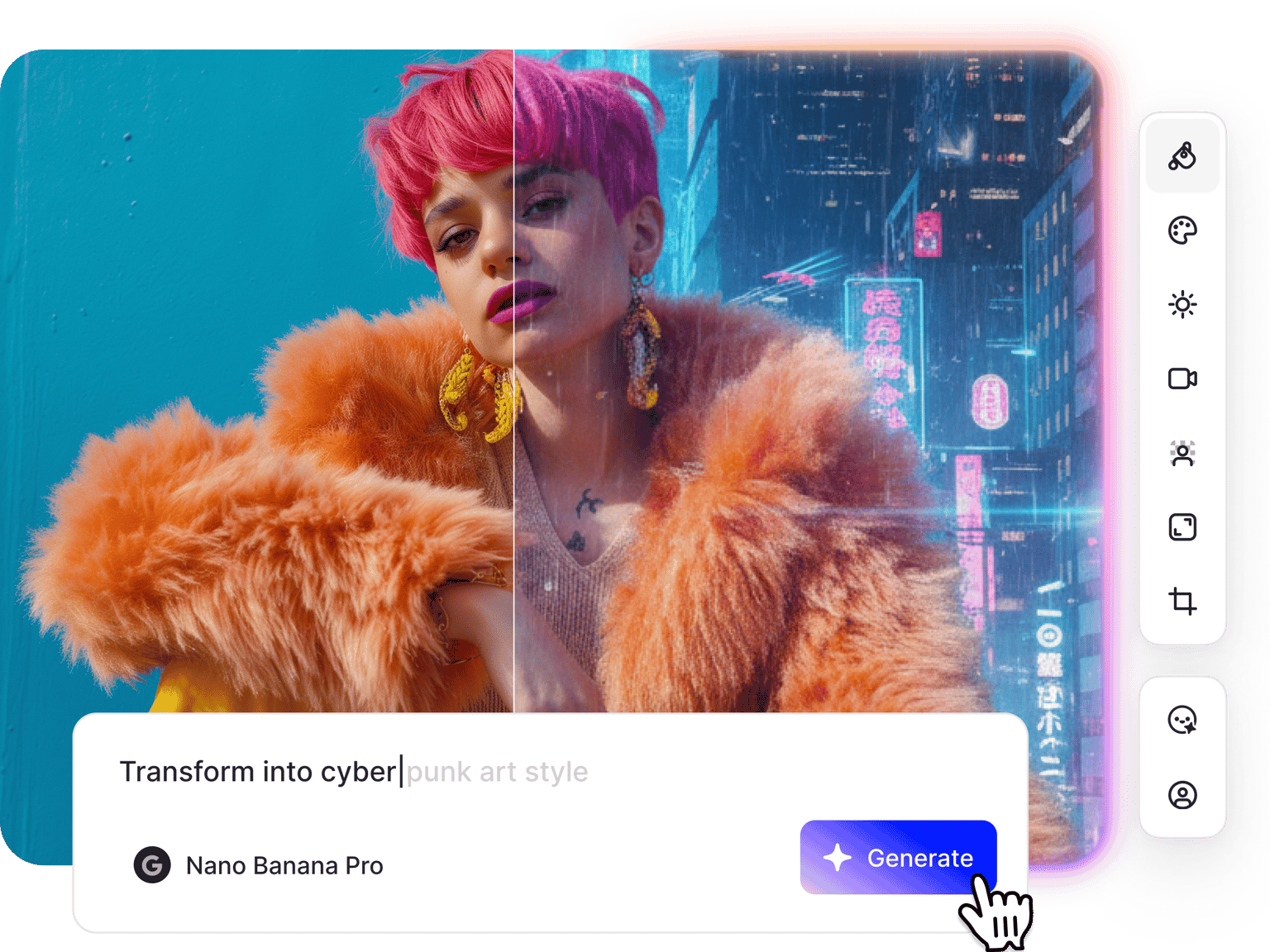
Change the style of your image using AI technology. Apply anime effects, oil painting styles, and custom artistic filters to any photo
No credit card required
4.6
2,100+ reviews















Transform images with AI style transfer
Apply artistic styles to any image with one-click presets or custom prompts. Choose from styles like anime, oil painting, watercolor, cyberpunk, and more. Or describe the AI art style transfer you want to see. The AI interprets your description and transforms your image instantly.
Access multiple AI models optimized for different artistic effects. Test and compare results to find the best one for your project. Once you've restyled your image, download it or animate it for video projects and dynamic social media content.
How to use AI style transfer:
Step 01
Upload your image to the editor
Upload the photo you want to transform. You can upscale your image first if you're working with low-resolution photos. The editor accepts JPG, PNG, and other common image formats.
Step 02
Choose a style or customize
Choose from preset styles like anime, oil painting, watercolor, cartoon, and cyberpunk. Or select an AI model and type a prompt for custom effects.
Step 03
Download or create a video
Save your styled image or generate variations with different artistic effects. You can also animate your styled image with image-to-video AI or add it to a video project in our video editor.
Learn More
Learn how to make anime videos from your images:
Photo to anime: Transform images into anime art
Turn any photo into anime-style artwork. Upload your image and prompt the AI to apply anime aesthetics—from watercolor styles to bold manga line art. Perfect for social media content, profile pictures, or creative projects. The AI image style transfer handles facial features, backgrounds, and color palettes to create anime-style results.
AI art style changer for creative projects
Change the artistic style of any image instantly. Apply oil painting effects, watercolor textures, comic book styles, or abstract art aesthetics. VEED's AI stylize image feature connects to our complete content platform. Style your images, then animate them or build video content using our video editor. No need to switch platforms.
Style transfer AI that connects to video workflows
Most style transfer tools stop at the download. VEED connects your style transfer AI workflow directly to video creation. Once you've transformed your image, animate it with image-to-video AI, or add your image to a video project with text and music. Create your styled assets and video content in one place.
FAQ
Style transfer AI transforms images by applying different artistic styles like anime, oil painting, or watercolor. VEED's photo style transfer tool offers one-click presets for instant results, plus prompt-based editing when you need specific changes.
Upload your image to VEED's AI image editor, then choose a preset style for instant transformation. Or select an AI model and describe the artistic style you want. Download the result or generate variations with different styles.
Yes. Upload your photo and describe the anime style you want: "Convert to anime art," or "Make this manga-style illustration." Different AI models handle different visual styles well. Test multiple models to find the best result.
You can apply anime styles, oil painting effects, watercolor textures, comic book styles, impressionist art, cyberpunk aesthetics, and more. Different AI models handle different artistic transformations. Test multiple models to find the best output for your image.
Yes, switch to text-to-image mode in the AI playground to generate an image from scratch. This gives you complete creative control over subject, composition, and style from the ground up.
Loved by creators.
Loved by the Fortune 500
“
With VEED I didn't need 15 tutorials - I jumped straight in and started editing.

Gwenne Wilcox
Founder,
Brand Brainery
“
You can go beyond choppping things. VEED actually makes my videos look great.

Michael Glover
Demand Gen Manager,
ConvertFlow
“
The first four videos i created with VEED got over 40,000 impressions on LinkedIn.

Travis Tyler
Senior Content Producer,
PandaDoc
“
I found VEED at the right time: if you're making UGC ads and not using Eye Contact Correction and Noise Reduction on VEED you're missing out on ROI.

Sebastian Schurgers
Head of Growth Marketing,
Gronda
“
With VEED I didn't need 15 tutorials - I jumped straight in and started editing.
Gwenne Wilcox
Founder,
Brand Brainery
“
You can go beyond choppping things. VEED actually makes my videos look great.
Michael Glover
Demand Gen Manager,
ConvertFlow
“
The first four videos i created with VEED got over 40,000 impressions on LinkedIn.
Travis Tyler
Senior Content Producer,
PandaDoc
“
I found VEED at the right time: if you're making UGC ads and not using Eye Contact Correction and Noise Reduction on VEED you're missing out on ROI.
Sebastian Schurgers
Head of Growth Marketing,
Gronda
“
The first four videos i created with VEED got over 40,000 impressions on LinkedIn.
Travis Tyler
Senior Content Producer,
PandaDoc
“
I found VEED at the right time: if you're making UGC ads and not using Eye Contact Correction and Noise Reduction on VEED you're missing out on ROI.
Sebastian Schurgers
Head of Growth Marketing,
Gronda
“
With VEED I didn't need 15 tutorials - I jumped straight in and started editing.
Gwenne Wilcox
Founder,
Brand Brainery
“
You can go beyond choppping things. VEED actually makes my videos look great.
Michael Glover
Demand Gen Manager,
ConvertFlow
Discover more
More from VEED
Best AI Image Generators: Top Tools for Creating Stunning Visuals in 2026
From text prompts to breathtaking visuals in mere seconds, AI image generators have revolutionized the way we create digital art. Whether you're building content for social, school, or just for fun, turning ideas into visuals has never been easier. This guide breaks down the best AI image generators of 2025. You'll see what each tool does well, where it struggles, and who it’s built for, so you can pick the right one for your goals and budget.

AI Art Prompts: How to Write Better Prompts, Creative Examples, and Tools to Try
Getting your AI art prompts is the key to winning with generative AI tools. Learn how to write better prompts here.

How to Cartoonize Your Photo with AI (Step-by-Step Guide)
Learn how to cartoonize your photo using AI, and how to use ChatGPT to craft the perfect visual prompt to bring your unique style to life.
Trusted by 1M+ creators
When it comes to amazing videos, all you need is VEED
No credit card required
More than an AI style transfer tool
Transforming images with style transfer is just the start. VEED is an AI video creation platform that lets you go from image generation to animation. Switch between the best AI models for different needs, such as realistic motion, stylized visuals, and native audio generation. Animate your images with image-to-video AI, or create talking videos with our lip sync video generator. From image editing to video creation, VEED brings all the tools in one place. Start creating now.