VEED vs. Quso AI: Which AI Video Editor Fits Your Workflow?

The quick comparison
Best for full-featured video editing: VEED — browser-based editor with AI avatars, voice cloning, real-time collaboration, and comprehensive editing tools
Best for repurposing long-form content: Quso AI — specialized in turning podcasts and YouTube videos into short-form social clips with built-in scheduling
Key differences:
- VEED: AI avatars, voice cloning, eye contact correction, 4K exports, team collaboration, brand kits
- Quso AI: IntelliClips auto-clipping, virality scoring, social media scheduler, carousel generator, AI content assistant
Is Quso AI free? Yes, the free plan includes 75 credits/month with 720p exports and a watermark. VEED also offers a free plan with basic features.

What is Quso AI?
Quso AI (formerly Vidyo.ai) is an AI-powered video repurposing platform designed to help creators and marketers turn long-form content into short, social-ready clips. Founded in 2022, the platform uses AI to automatically identify engaging moments from podcasts, webinars, and YouTube videos, then formats them for TikTok, Instagram Reels, and YouTube Shorts. Quso AI positions itself as more than an editor: it's a social media content engine with built-in scheduling, analytics, and a virality prediction score.
Best features of Quso AI
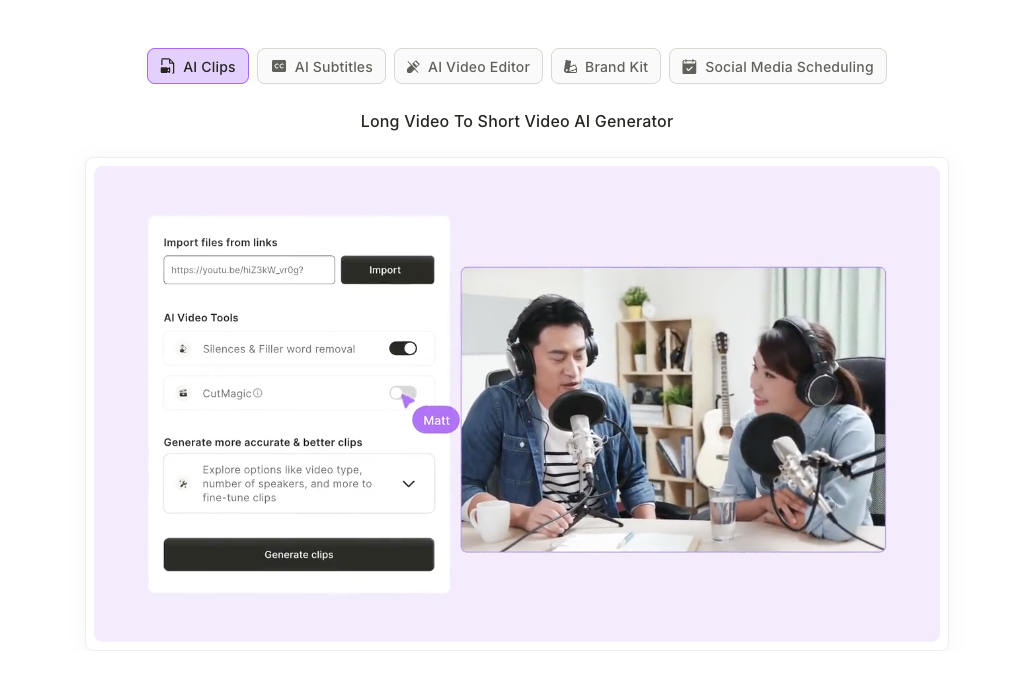
- IntelliClips: AI automatically detects highlight moments and creates multiple short clips from a single long video
- Virality scoring: Predicts which clips are most likely to perform well on social media
- Built-in social scheduler: Schedule and publish directly to TikTok, YouTube, Instagram, and LinkedIn
- AI content assistant: Converts video content into blogs, show notes, and social captions with hashtags
VEED vs. Quso AI: How they compare
When it comes to core editing capabilities, VEED offers a more complete video editor. You get a full timeline, trimming tools, text overlays, filters, and transitions: everything you'd need to create videos from scratch. Quso AI, by contrast, focuses almost entirely on repurposing existing content. If you need to record, edit, and polish original footage, VEED is the stronger choice.
AI-powered features take different directions across platforms. Quso AI excels at content automation: it'll break your video into clips, add captions, insert B-roll, and even suggest posting times. VEED's AI tools are broader, including AI avatars that speak your script, voice cloning for multilingual content, eye contact correction, background removal, and Magic Cut for automated editing. For creators who need to produce new content (not just repurpose it), VEED delivers more.
Collaboration and team workflows clearly favor VEED. Multiple team members can edit the same project simultaneously, leave timestamped comments, and access shared brand assets. Quso AI works well for solo creators but lacks real-time collaboration features. For agencies or marketing teams, VEED scales better.
Pricing structures differ significantly. Quso AI starts at $19/month (Lite) on a credit-based system, with limited upload minutes that refresh monthly. VEED's Lite plan is $12/month with Pro at $29/month, offering unlimited projects without per-minute caps. Both have free tiers, but VEED's free plan includes more editing features while Quso AI's free plan focuses on basic clip generation with watermarked 720p exports.
Social media integration is where Quso AI shines. It's built specifically for social workflows: you can schedule posts, track analytics, and manage multiple channels from one dashboard. VEED supports direct publishing to social platforms, but Quso AI's scheduler and content calendar are more robust for creators managing high-volume posting.
Advanced features of VEED
- AI avatars and voice cloning: Create talking-head videos without recording, or clone your voice for content in multiple languages
- Eye contact correction: Automatically adjusts your gaze to look directly at the camera, even when reading a script
- Real-time team collaboration: Multiple editors can work on the same project with shared comments and brand assets
- 4K exports and brand kits: Professional output quality with saved logos, fonts, and colors for consistent branding
What real users are saying
User reviews paint a mixed picture of both platforms.
On Quso AI (formerly Vidyo.ai):
Fans praise the time savings. One Product Hunt user shared:
"I'm a fan of the simplicity of Vidyo.ai. I use it to compile reels effortlessly."
However, not all experiences have been positive. Another reviewer wrote:
"It is SO buggy and so many times it glitches out & I have to start completely over and redo all of my editing."
On VEED:
Beginners consistently praise the ease of use. One Trustpilot reviewer said:
"I used VEED for making Instagram reels, and it was so effortless. Great for people who are beginners."
On the flip side, a Capterra reviewer reported:
"There are so many bugs and errors in their software, you'll spend most of your time pulling your hair out!"
The takeaway: Both platforms have fans and critics. Quso AI users love the repurposing speed but encounter occasional glitches. VEED users appreciate the beginner-friendliness, though some report technical hiccups.
Why choose VEED over Quso AI
For marketers, businesses, and content creators who need versatility, VEED is the more complete solution. While Quso AI excels at one thing (turning long videos into short clips), VEED handles the entire video creation workflow: recording, editing, enhancing, collaborating, and publishing.
If you're already producing original video content and need professional-grade editing tools with AI enhancements, VEED fits better. Quso AI makes sense for podcasters or YouTubers who primarily want to repurpose existing footage, but its limited editing capabilities mean you'll likely need another tool for anything beyond clipping.
VEED's free plan lets you explore most features before upgrading, and the transparent subscription pricing means no credit calculations or surprise limits.
FAQ
Yes. Quso AI offers a free plan with 75 monthly credits, 720p exports, and watermarked videos. Paid plans start at $19/month for 1080p exports and expanded AI tools.
Quso AI specializes in repurposing long-form videos (podcasts, webinars, YouTube content) into short-form social media clips. It's designed for content creators who want to maximize reach across TikTok, Reels, and Shorts.
Yes. VEED's Magic Cut and AI editing tools can automatically trim and enhance videos for social platforms. Unlike Quso AI, VEED also offers comprehensive video editing to create videos from scratch.
VEED. Its real-time collaboration, shared projects, and brand management tools make it better suited for teams and agencies. Quso AI is optimized for individual creators.
Yes. Quso AI offers various AI-powered tools, including a YouTube channel name generator and content ideation features.
Quso AI was formerly known as Vidyo.ai. The platform rebranded while expanding its features beyond just video clipping to include broader social media management tools.