Seedream 4.5 Prompt Guide: Get Better Results in 5 Steps

- Seedream 4.5 is ByteDance's AI image generator that creates photorealistic images at resolutions up to 4K, with strong capabilities in portrait photography, product imagery, poster design, and multi-image editing
- The Seedream 4.5 prompt format uses a 5-part structure: subject, style, composition, lighting and atmosphere, and technical parameters for optimal results
- Seedream 4.5 has stronger understanding of text prompts than older versions, which means concise and precise prompts typically outperform long, overly descriptive ones
Most people who try Seedream 4.5 for the first time get decent results. A few tweaks later, they start getting great ones. The difference almost always comes down to how the prompt is written.
Seedream 4.5 is not like earlier image generators that needed long, keyword-heavy instructions to produce anything usable. This model thinks more like a visual directon. It prioritizes what you put first, responds to structure, and rewards clarity over quantity. Give it a well-organized prompt and it will produce sharp, photorealistic images with accurate textures, natural lighting, and faces that actually look like faces.
But without understanding how it interprets prompts, you end up with generic outputs, repeated regenerations, and results that never quite match what you had in mind.
In this guide, you will learn exactly how to structure your prompts, when to use negative prompts, and how to get professional-quality results from the start.
What you will learn: The 5-element Seedream 4.5 prompt structure, negative prompt strategies, text rendering tips, and proven examples for different use cases.
What Seedream 4.5 excels at

Seedream 4.5 creates realistic images with natural lighting, accurate textures, and balanced proportions. It handles faces, materials, and environments more reliably than earlier versions, making it suitable for product photography, portraits, and detailed scenes.
Other standout strengths:
- Accurate text rendering. It generates readable, correctly spelled text within images, which sets it apart for marketing materials, signage, and branded content
- Strong character consistency across multiple images, supporting up to four reference images
- Advanced image editing through text prompts, including addition, deletion, replacement, and modification of elements
What to avoid:
- Stacking ornate and complex vocabulary -- concise and precise prompts work better than repeatedly layered descriptors
- Abstract descriptions without concrete visual references
- Conflicting style directions in a single prompt
Core Seedream 4.5 prompting framework
Seedream 4.5 gives priority to whatever you place first and expects ideas to be structured. The model builds images with clarity when prompts follow the order: subject, style, composition, lighting.
The 5-Part prompt structure
Seedream 4.5 prompt template
[Subject], [Style], [Composition], [Lighting and atmosphere], [Technical parameters]
Seedream 4.5 prompt example
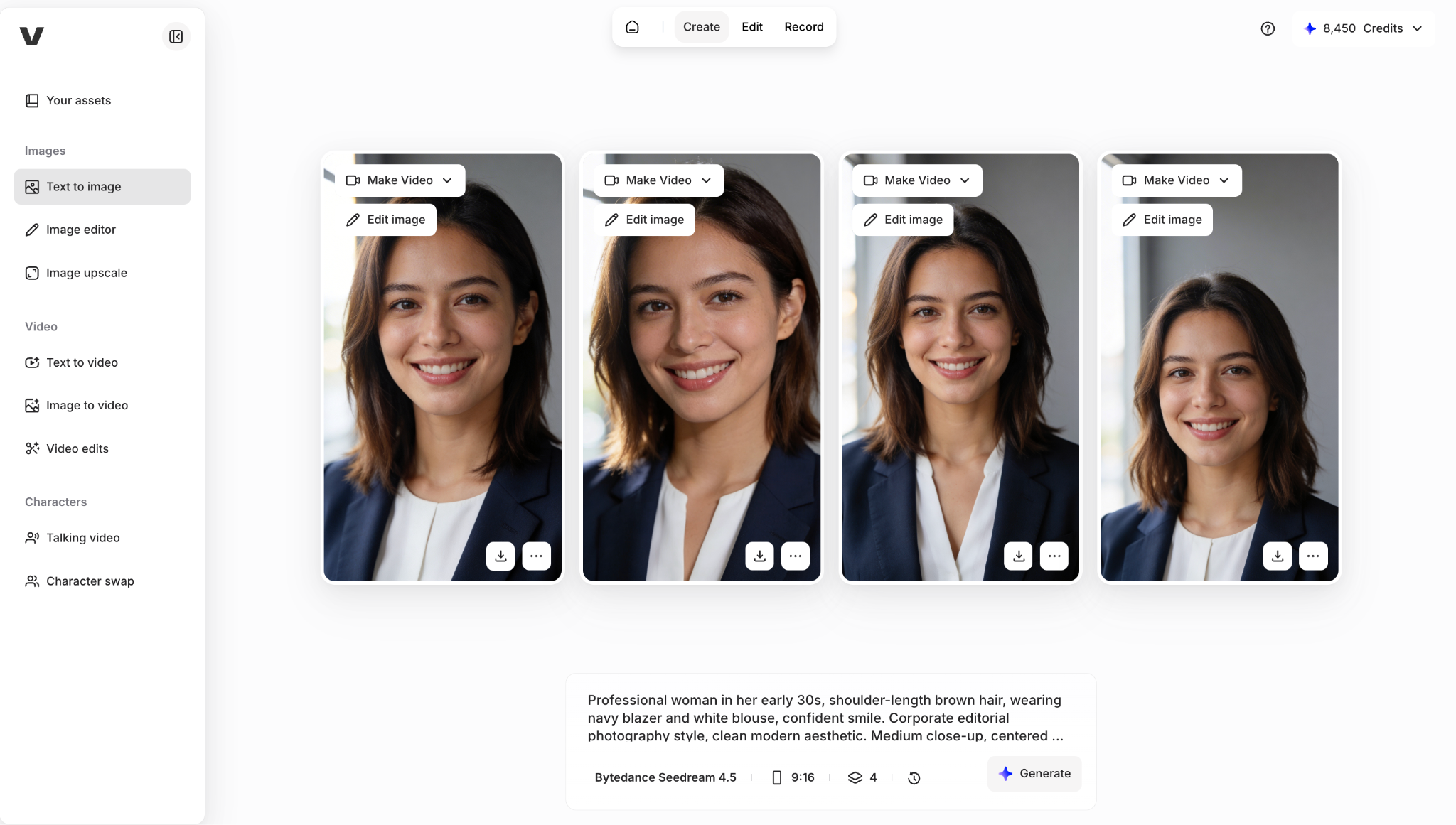
"Professional woman in her early 30s, shoulder-length brown hair, wearing navy blazer and white blouse, confident smile. Corporate editorial photography style, clean modern aesthetic. Medium close-up, centered composition, neutral gray background with soft bokeh. Soft natural window light from left, warm professional atmosphere. Shot on Canon EOS R5, 85mm lens at f/1.8, shallow depth of field, 4K quality."
Advanced Seedream 4.5 techniques
Seedream 4.5 negative prompt
Instead of overloading the main prompt, fix problems by excluding unwanted elements through negative prompts.
When to use: Every generation to eliminate common artifacts and maintain professional quality.
Example negative prompt: "No distorted anatomy, no cartoon effects, no blurry faces, no oversaturated colors, no extra fingers, no watermarks, no unnatural skin texture, no harsh shadows."
Text rendering in images
Use double quotation marks around any text that needs to appear in the generated image for better accuracy.
Example: "Generate a poster with the title "Summer Sale" in bold sans-serif font, minimal white background."
Reference image prompting
When combining text prompts with reference images, the model respects both inputs and maintains key visual details such as character features, colors, and overall composition. This reduces the need for multiple regenerations.
Common mistakes and fixes
Getting started with Seedream 4.5
Use coherent natural language to describe the subject, action, and environment. If aesthetics matter, include descriptors of style, color, lighting, and composition. Start with simple single-subject prompts before attempting complex multi-image or editing tasks.
Try Seedream 4.5 alongside other leading AI image generators in VEED's AI Playground, where you can compare outputs and use generated images directly in your video editing workflow.