How to Make Original Tracks Without a Production Budget with an AI Music Generator

.png)
An AI music generator that’s free to try turns a text prompt into an original track in minutes, with no instruments, no stock library and no licensing paperwork. You describe the genre, tempo and mood, the model composes the audio, and you get a song nobody else has. For social video, that solves the problem stock music never could: the track fits your edit because it was written for your edit.
Key takeaways
- An AI music generator composes an original track from a text prompt describing genre, mood, tempo and instruments.
- Three things decide if a track is usable: vocals or instrumental, download format, and commercial rights.
- Prompt for sound, not feelings: name the genre, lead instrument, BPM and the job the track does.
- VEED's AI music generator takes a prompt plus lyrics mode, BPM and vibe controls and exports an MP3.
- Generate music where you edit so the track lands in the video with your captions and brand colors.
The video is done. The cuts are tight, the captions are clean, the hook lands in the first two seconds. Then you open the stock library and spend twenty minutes scrolling the same eleven corporate-ukulele tracks everyone else uses, until you pick the one you will hear in three competitor ads this week.
Music gets treated as the last item on the checklist and quietly does more of the work than anything except the hook. It sets the pace, it tells people how to feel before they have read a word, and when it is wrong, it is the clearest signal that a video was assembled rather than made.
This guide covers how text-to-music tools work, what separates a usable track from a demo, how to prompt for music you would keep, and how to score a batch of social videos without opening a second tab.
What an AI music generator free of charge actually does

An AI music generator takes a written description and returns a finished audio track: melody, arrangement and instrumentation. Many tools also write lyrics and sing them. You type "warm lo-fi beat with soft piano, relaxed, for a product explainer" and the generator composes a track to that brief instead of pulling the nearest match from a catalog.
The useful mental model is commissioning, not searching. A stock library can license the same track to ten thousand brands. A generated track exists because you described it, so no one else is posting it this week. That is the whole reason text-to-music matters for social video: the sound is as specific to your brand as the cut.
What you can control in a text-to-music tool
Most AI music generators expose some version of five inputs:
- Prompt: the description of the track. Genre, mood, instrumentation, use case.
- Lyrics mode: AI-written lyrics, your own lyrics, or instrumental only.
- Tempo (BPM): how fast the track moves, usually a slider somewhere between 60 and 200.
- Vibe or mood: a preset emotional direction such as cheerful, active, relaxing or moody.
- Length: how long the track runs, though many tools fix this for you.
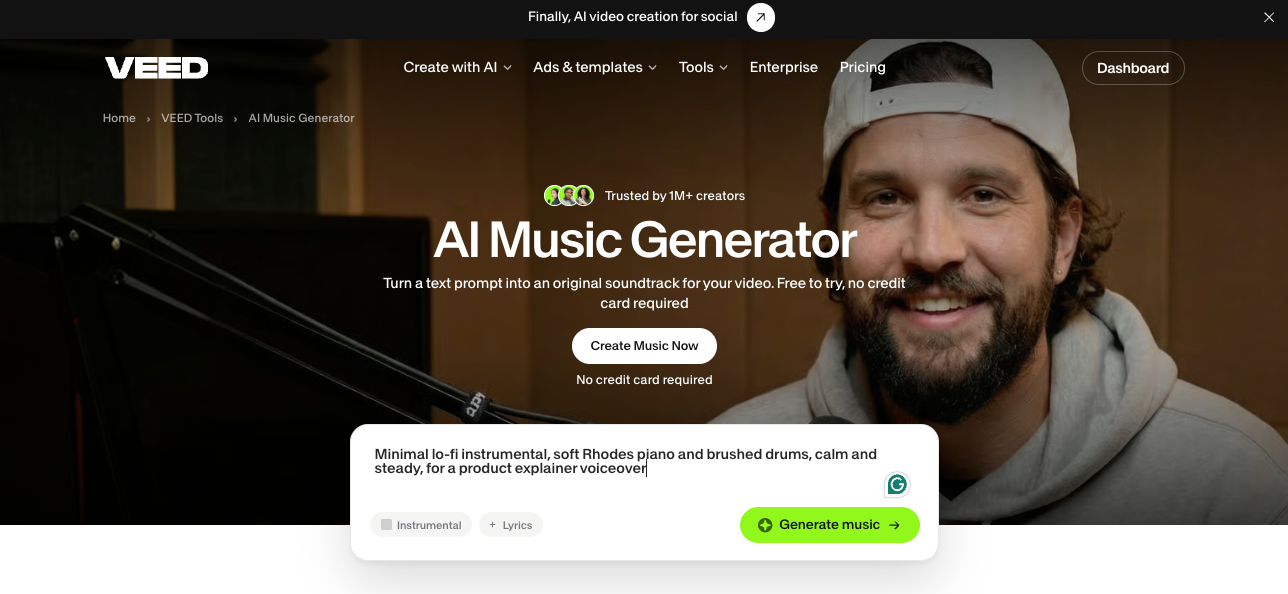
VEED's AI music generator exposes four of these: prompt, lyrics mode, BPM (60 to 200, defaulting to 120) and a vibe selector. That short list is deliberate. The goal is not to hand you a mixing desk. It is to get you from idea to usable track without learning a new vocabulary first.
What an AI music generator does not do
An AI music generator will not recreate a specific commercial song, and you should not ask it to. It will not mix your voiceover for you. And it will not rescue a video with no structure. Music amplifies what is already there: if the edit drags, a better track gives you a well-scored video that drags.
How an AI music generator turns text into a track
An AI music generator turns text into music by converting your prompt into musical structure (key, tempo, instrumentation, arrangement), then generating the audio waveform from scratch, conditioned on that structure. The model is not looking up tags in a library. When you write "driving synthwave, 110 BPM, nostalgic," it composes a new track that matches those words.
Modern music models are trained on large volumes of audio paired with descriptions, so they learn the relationship between words and sound: what "brushed drums" sounds like, how a "big chorus" is built, what tempo "relaxed" implies. The generation itself typically runs through three stages:
- Interpretation. Your prompt becomes structure: key, tempo, instrumentation, arrangement.
- Generation. The model produces the audio, often streaming partial results so you hear the track forming before it finishes.
- Finishing. Cover art, a title and an exportable file land at the end, sometimes independently of each other.
In VEED, each generation streams in, so the track card appears mid-generation with the partial song playing while the rest renders. A long run takes roughly two and a half minutes. You will see "In queue" briefly, then progress, then a playable result. VEED's generator is built on the latest frontier music model, so the output improves as the underlying models do.
Key features to look for in any text-to-music tool
- Streaming playback, so you are not staring at a spinner for three minutes
- A real download, not browser-only playback
- Instrumental mode, for anything with a voiceover
- Custom lyrics input, for when you need specific words
- Tempo control, so the track can match your cut rhythm
- Commercial usage terms stated plainly, not buried in a help center
That last one is the one people skip and regret.
AI music generator with vocals vs instrumental tracks: Which to use
Use an instrumental track for any video with a human voice in it, and use vocals for montages, teasers and text-only ads where the song does the emotional work. This is the fork that decides whether a track works for your video, and most people get it backwards.
Note: if there is a human voice in your video, default to instrumental. Exceptions exist, but they are exceptions.
A free AI music generator with vocals is useful for montage and ad work, where the song does the emotional lifting the b-roll cannot. VEED's AI music generator handles both: pick Auto-Generate for AI-written lyrics, Write My Own to supply your own, or Instrumental to strip vocals entirely. Choosing Instrumental hides the lyrics field, so you are not scrolling past controls you do not need.
Writing your own lyrics
Write My Own is the lyrics mode to use for ads. If you want the product name in the chorus, type it. The prompt still gets sent alongside your lyrics, so you are describing the sound while dictating the words. Genre direction goes in the prompt, specific words go in the lyrics field. Once the track is done, add the music to your video without leaving VEED.
AI music generators that are free and unlimited: What the terms really mean
"Unlimited" in an AI music generator almost always means unlimited generation, with the real limit placed on downloads, quality or commercial rights. Search results are full of tools promising an AI music generator that's free and unlimited. Read the terms before you build a campaign on one. In practice, "unlimited" means one of four things:
- Unlimited generation, limited downloads
- Unlimited generation at low quality, paid for anything exportable
- Unlimited on a daily reset, which is a cap with better branding
- Unlimited for personal use only, with commercial rights gated behind a plan
None of these are scams. They are business models. But if you are making video for a business, only two questions matter: can I download a clean file, and can I post it commercially? A tool that nails one and fails the other is a tool you will abandon halfway through a project.
Can you use an AI music generator for free without signing up?
Most AI music generators, VEED included, let you start a generation as a guest and ask you to sign up to claim the finished track. Searches for a free AI music generator with no sign up come down to one thing: you want to hear the output before you commit, which is fair. In VEED, the run is held, not lost. You sign up, and the generation resumes with your original prompt and settings intact. You do not start over.
A note on music rights
Whatever tool you use, confirm the license before the track goes into a published video. Copyright claims on social platforms are slow to resolve, and they hit the post that was working. Check three things: whether commercial use is included, whether monetized content is covered, and whether the license survives if you cancel the plan.
How to generate a track you would actually keep
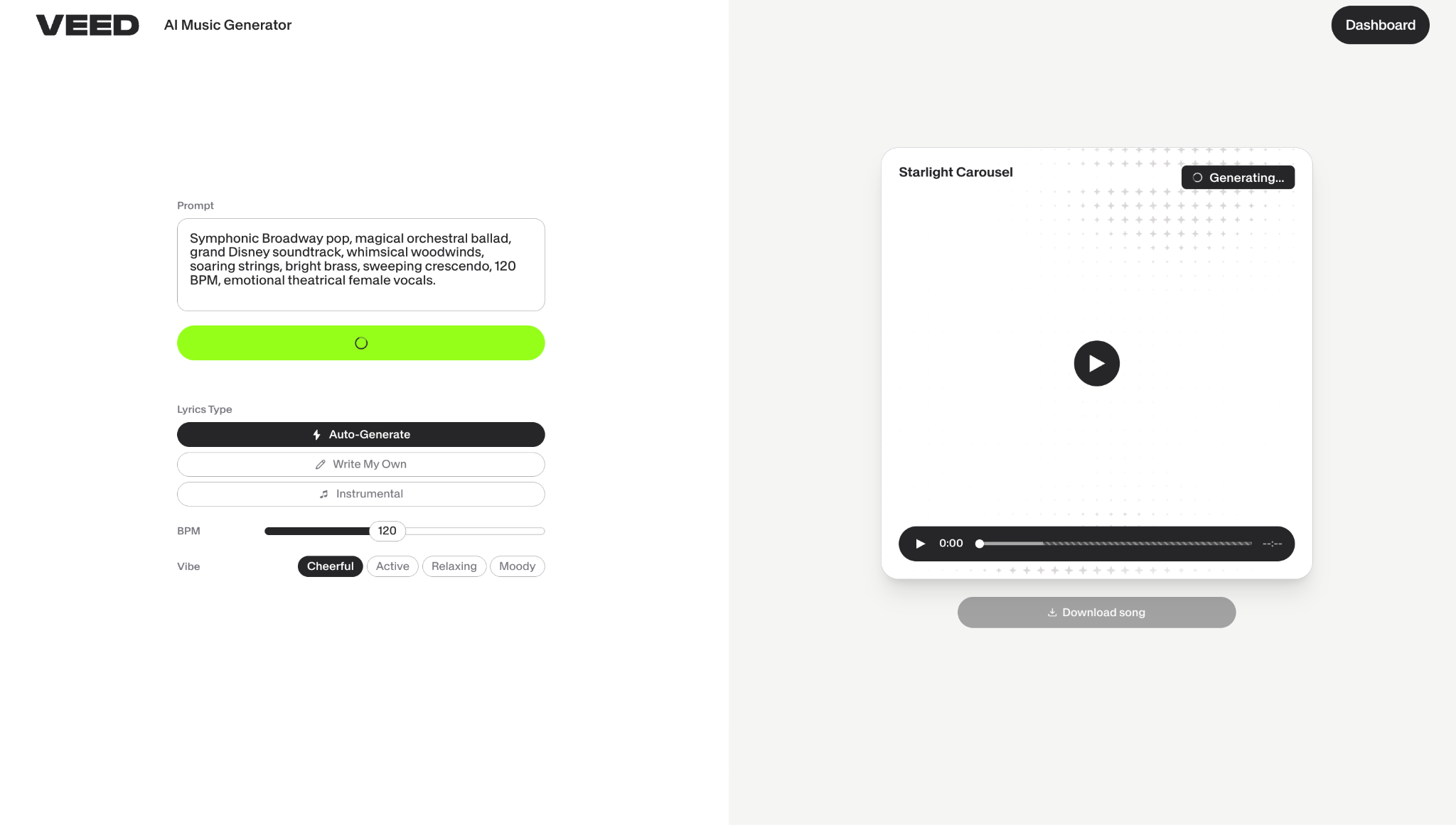
To generate an AI music track worth keeping, decide the vocals, tempo and mood from the video first, then write the prompt as a brief that names a genre, a lead instrument, an energy level and the job the track does. Most first generations are mediocre for the same reason most first AI videos are mediocre: the prompt described a feeling instead of a sound. Here is the framework that fixes it.
1. Start from the video, not the song
Before you type anything, answer three questions about the video the music is for:
- Is there a voice in it? This decides vocals or instrumental.
- How fast does it cut? This decides BPM. Fast social cuts want 120 to 140. A slow product walkthrough wants 70 to 90.
- What should the viewer feel in the first second? This decides vibe.
You now have three of your four inputs before you have opened the tool.
2. Write the prompt like a brief, not a wish
For background music under a voiceover
🥇 Best choice: Name the genre, the lead instrument, the energy and the job.
"Minimal lo-fi instrumental, soft Rhodes piano and brushed drums, calm and steady, for a product explainer voiceover"
Set Instrumental, drop BPM to around 85, pick a relaxing vibe. You get something that sits under speech instead of climbing over it.
🥈 Runner-up: Strip it further. "Ambient pad, no percussion, warm" when even drums are too much movement for the edit.
For a launch teaser or montage
🥇 Best choice: Push the energy and let vocals in.
"Upbeat indie pop with bright guitars and a big chorus, confident and celebratory, 128 BPM"
Set Auto-Generate for lyrics, BPM around 128, active vibe. Let the track carry the emotion the b-roll cannot.
🥈 Runner-up: Same brief, Instrumental mode, if you are adding on-screen text that needs reading room.
For a repeatable social series
🥇 Best choice: Generate one track, then reuse the same prompt and settings across the series with small variations. Consistency across posts is what makes a feed look like a brand instead of a pile of uploads.
🥈 Runner-up: Generate three variations on the same prompt and rotate them, so the series feels related without feeling repetitive.
3. Set BPM deliberately
The default is 120, which is fine, and also why so many AI tracks sound the same. Move it. Match the tempo to your cut rhythm and the video stops feeling like a video with music stapled on.
4. Listen on your phone
Social video is watched on phone speakers at low volume, often on mute until something earns attention. A mix that sounds rich in headphones can turn to mud on a phone. Check before you publish.
5. Finish in the same place you started
Here is where most workflows fall apart. You generate a track, download it, open another app, re-import, fight the sync, export, then realize the track is eight seconds short. That is not a music problem. That is a tool-switching problem.
Generating music inside VEED means the track lands in the same project as the video it is for. You add subtitles, apply your brand colors and fonts, and export without the download-and-reimport loop. VEED is an AI video creation platform built for social, so generation is the first half of the job and making it yours is the second.
Best practices for scoring social video with AI music
Good music decisions on social come down to three habits: match the track to the platform, prompt for sound rather than mood, and keep tempo and genre consistent across a series. The stakes are real. In a Kantar study commissioned by TikTok, 88% of TikTok users said sound is essential to the experience, and 73% said they would stop and look at an ad with audio. On LinkedIn, the opposite holds: most plays start muted. The track has to do a different job on each feed.
Matching AI music to the platform
- TikTok and Reels: The first second is the whole negotiation. Lead with something that has immediate rhythmic identity. No long intros, no ambient fade-ins.
- LinkedIn: Most plays start muted. Music is support, not structure. Keep it low, keep it instrumental, and make sure the video works silent with captions.
- YouTube: Longer runway, so a track can build. Use tempo shifts to mark sections of the video.
- Instagram feed: Vocals perform well here, especially on montage and product content where there is no narration to protect.
- Paid ads: Test two tracks against the same cut. Music changes watch time more than most creative variables, and it is cheap to A/B.
Getting more from your music prompts
- Name instruments, not adjectives: "Warm" is a guess. "Rhodes piano and upright bass" is a direction.
- State the use case in the prompt: "for a product explainer" tells the model to leave space in the mix.
- Give it a tempo in words and in the slider: Redundancy helps.
- Describe the arc: "Builds from sparse to full by the halfway point" gives the track a shape your edit can use.
- Regenerate once before you rewrite: The same prompt on a different run often gives a different result, and it is cheaper than rethinking.
Keeping music consistent across a batch
- Save your winning prompt: Treat it like a brand asset. It is one.
- Lock BPM across a series: The fastest way to make five separate videos feel like a campaign.
- Pick a lane and stay in it: Choose two or three genres that fit your brand and generate within them. Range is for playlists, not brands.
- Build a small library: Generate four tracks in a batch, keep them in a folder, score a month of content from it.
- Check the handoff: The track should land in your video with the same colors, fonts and captions you already use. If adding music means switching tools, you will stop adding music.
For a music-led piece where the visuals are built around the track rather than the other way round, VEED's music video generator covers the visual half of the same workflow.
What to take away
Here is what to remember:
- Music is not decoration: It sets pace and emotion before a single word registers. Treat it as part of the edit, not the thing you do last.
- Instrumental is the default for anything with a voice: Vocals and voiceover compete, and the voiceover loses.
- Prompt for sound, not feelings: Name the genre, instruments, tempo and use case. Four ingredients make better tracks.
- Check the license before you publish, not after: Download format and commercial rights decide whether a free tool is actually free.
- Generate where you edit: Speed you gain in generation disappears if you spend it stitching files between tools.
Describe the track you need, set your BPM and vibe, and generate it in minutes with our music generator. Then add your captions, colors and fonts and post it, all in one place.
FAQ
Both. In VEED, Auto-Generate writes lyrics for you, Write My Own lets you supply your own words while the prompt describes the sound, and Instrumental strips vocals entirely. For any video with a voiceover, choose Instrumental, because sung vocals and spoken narration compete for the same space in the mix.
Usually between a few seconds and around two and a half minutes, depending on the run. In VEED the result streams in, so you hear the partial track playing while the rest finishes rather than waiting on a blank screen. Download becomes available once the full run completes.
In VEED, yes. Tracks you generate are yours to use in the videos you post, including on social. If a video needs artist-made music with cleared commercial rights, VEED also includes a royalty-free library you can drop onto the same timeline. With other tools, check the license terms for commercial use, social posting and monetization before a track goes into a published video, because copyright claims on social platforms are slow to resolve and tend to hit the post that was performing.
Most tools export MP3, and some offer WAV on paid plans. VEED's AI music generator exports an MP3 you can download and drop into your video. Download stays disabled while a track is still streaming, so wait for the run to finish before saving.
Start from the video, not the song:
- Decide vocals or instrumental based on whether there is a voiceover
- Write a prompt naming the genre, lead instruments, energy and use case
- Set BPM to match your cut rhythm: faster for quick social cuts, slower for walkthroughs
- Pick a vibe, generate, and listen on a phone speaker before you commit
- Drop the track into your video and finish with your captions and brand colors in the same workflow