Seedream 4 Prompt Guide: Get Better Results in 5 Steps

Seedream 4 essentials
- Seedream 4.0 is a text-to-image and image-editing AI model developed by ByteDance that integrates text-based image generation with precise image editing in a single, unified system.
- The Seedream 4 prompt format uses a 5-part structure: subject, style, composition, lighting, and details for optimal results.
- Seedream 4.0 has a stronger understanding of text prompts than older versions, meaning concise, precise prompts work better than repeatedly stacking ornate, complex vocabulary.
Most AI image generators ask you to guess what kind of language they respond to. Seedream 4.0 removes that guessing game. It understands natural language the way you actually write it, which means your prompts can sound like clear directions rather than a list of keywords thrown at a wall.
What makes Seedream 4.0 genuinely different is its unified approach to generation and editing. You are not switching between tools or workflows. The same model that creates an image from scratch can also take a reference, swap a background, or refine specific elements using a follow-up prompt. For creators, marketers, and designers working at speed, that flexibility is a significant advantage.
But the model still rewards structure. A well-organized prompt consistently outperforms a vague one, no matter how capable the underlying system is. This guide gives you the exact framework to get professional results from your very first generation.
What you will learn: The 5-element Seedream 4 prompt structure, negative prompt strategy, reference image tips, and proven examples for portraits, products, and branded content.
What Seedream 4 Excels At
Seedream 4.0 is the first model of its kind to generate up to 9 images simultaneously with consistent style and content, and supports up to 6 reference images to guide creation. Other standout strengths:
- Supports multimodal input, including text, image, video, and subject, while producing high-resolution 2K and 4K visuals for posters, brand elements, packaging, and promotional materials
- Knowledge-based generation capabilities that can intelligently create diagrams, charts, and educational illustrations from informational prompts
- Strong character and style consistency across batch outputs, making it ideal for campaigns, storyboards, and product series
What to avoid:
- Vague pronouns and abstract descriptions without concrete visual references
- Conflicting style directions in a single prompt
- Overcrowded compositions with too many competing subjects
Core Seedream 4 Prompting Framework
Use coherent natural language to describe the subject, action, and environment. If aesthetics matter, include descriptors of style, color, lighting, or composition. The model builds the strongest images when prompts follow a clear order: subject first, then style and context, then finishing details.
The 5-Part Prompt Structure
Seedream 4 Prompt Template
[Subject], [Style], [Composition], [Lighting], [Details]
Seedream 4 Prompt Example
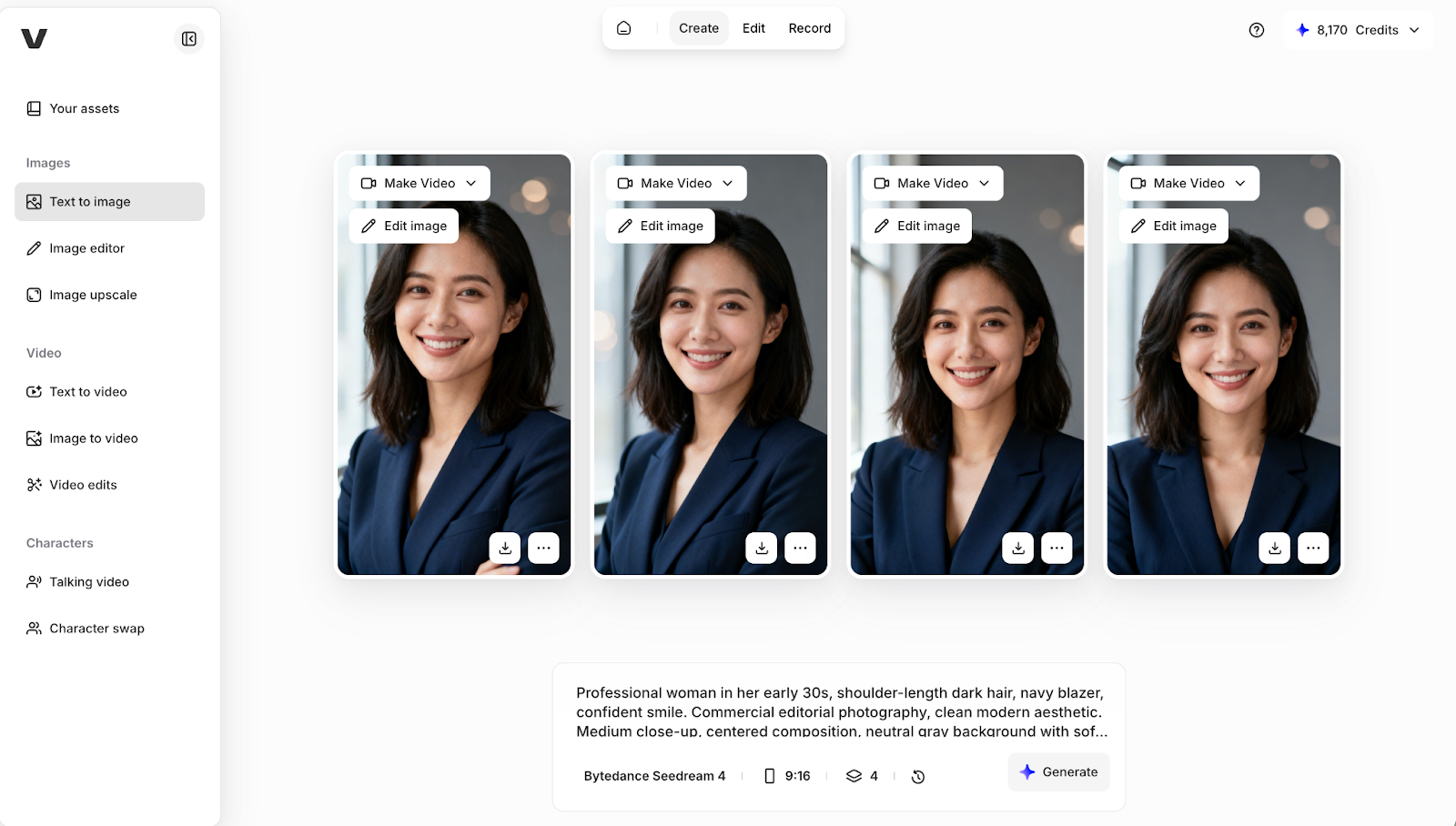
"Professional woman in her early 30s, shoulder-length dark hair, navy blazer, confident smile. Commercial editorial photography, clean modern aesthetic. Medium close-up, centered composition, neutral gray background with soft bokeh. Soft, natural window light from the left; warm, professional atmosphere. Shot on 85mm lens at f/1.8, shallow depth of field, 4K quality."
Negative Prompt Strategy
Use the negative prompt field to remove unwanted artifacts and keep outputs clean. Keep it short and targeted rather than generic.
Example negative prompts by use case:
- Portrait: "Distorted face, extra fingers, asymmetrical eyes, blurry, low quality."
- Product: "Background clutter, shadows, grainy, overexposed, low resolution."
- Illustration: "Photorealistic, 3D render, flat colors, watermark."
Advanced Seedream 4 Techniques
Reference Image Prompting
When blending multiple references, specify which elements come from which image. For example, replace the character in Image 2 with the character from Image 1, and generate the result in the style of Image 3. This reduces regenerations and gives you precise control over the final output.
Text Rendering
Place all required text inside double quotation marks for best accuracy. Keep phrases short and specify font style and placement for clean, readable results.
Example: "Product poster with headline 'Summer Drop 2026' in bold sans-serif, minimal white background, clean editorial layout."
Batch Generation
Trigger batch creation by including phrases like "series," "set," or "generate a series of four product mockups" to instruct the model to produce multiple related images. This is particularly useful for ad campaigns, storyboards, and e-commerce catalogs.
Prompt Examples by Use Case
Portrait: "Young woman in her late 20s, natural curly hair, white crewneck sweater, warm smile. Fine art lifestyle photography with a soft, airy aesthetic. Slightly off-center composition, clean light background. Golden hour window light from left, shallow depth of field, shot on 85mm f/2.8." Negative: "Blurry, artificial skin, distorted features, overexposed, low quality."
Product: "Luxury skincare serum bottle on white marble surface, gold cap, frosted glass, clean negative space. High-end commercial product photography, overhead angle. Controlled softbox lighting with subtle shadow underneath, ultra-sharp detail, 4K output." Negative: "Background clutter, grainy, shadows, low resolution."
Branded poster: "Event poster, headline 'Future Forward 2026' in bold sans-serif at top, abstract geometric shapes in electric blue on dark background, clean professional layout, designer-level typography." Negative: "Blurry text, low quality, cartoonish, cluttered."
Common Mistakes and Fixes
Getting Started with Seedream 4
Start with a clear subject description, add your style and composition, then layer in lighting and technical details. Use a reference image when consistency matters and include a short negative prompt every generation.
Try Seedream 4 alongside other leading AI image generators in VEED's AI Playground, where you can compare outputs and use generated images directly in your video editing workflow.