


Trusted by 1M+ creators
Lens Flare Effect
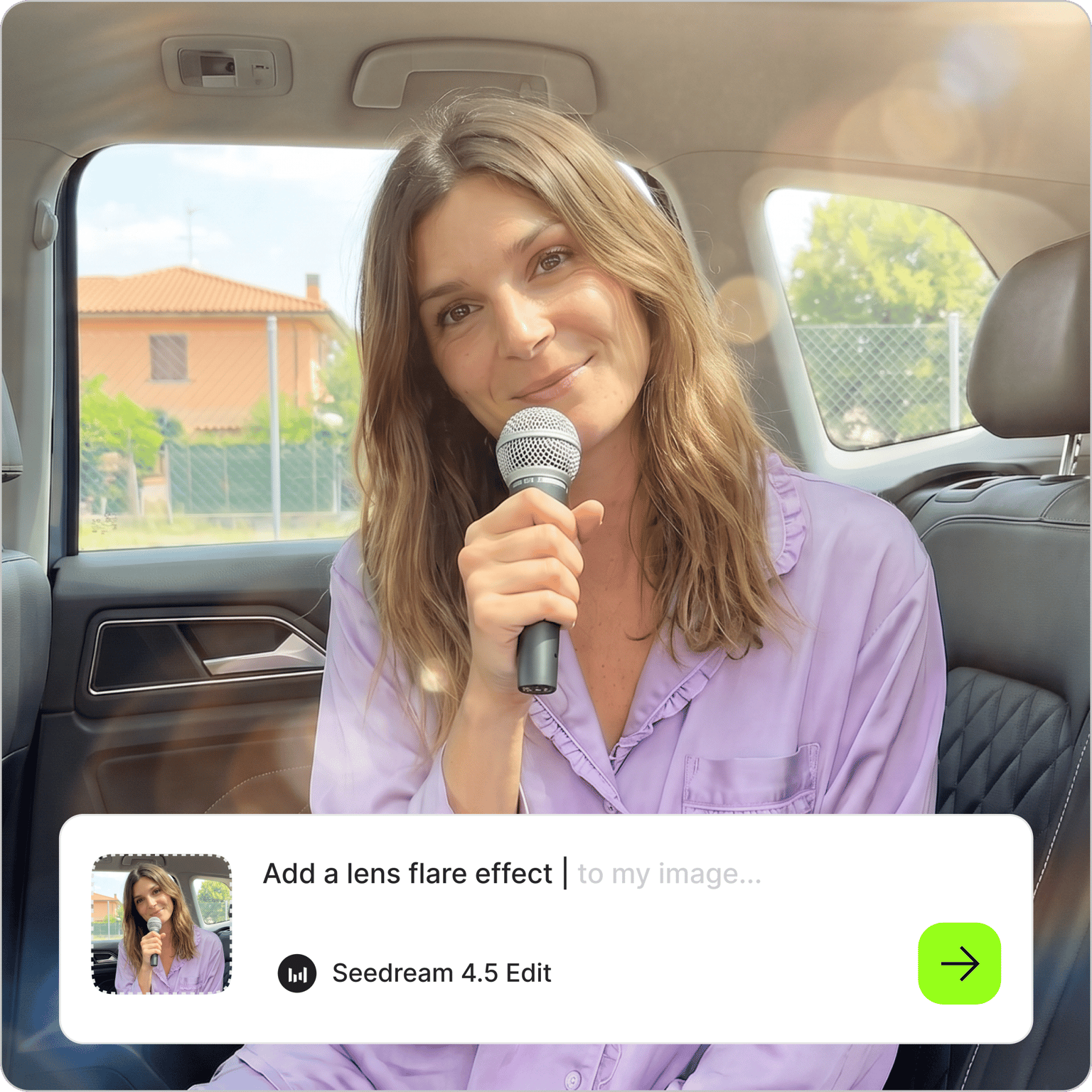
Add a lens flare to any photo by describing the light you want
No credit card required
4.6
2,100+ reviews












Cinematic lens flare, added with one sentence
A lens flare effect used to mean a Photoshop filter or an overlay file you had to blend by hand. Now you type it. Upload a photo to VEED's AI image editor, describe the light you want and where it should come from, and generate a version with the glow in place.
Photographers use it to warm up a flat portrait with a sun flare. Creators add an anamorphic streak to thumbnails for a film look, and sellers give car or jewelry shots a bright highlight. To change the whole lighting setup instead of adding one accent, try relight photo.
How to add a lens flare to a photo:
Step 01
Upload your photo
Add the image you want to light up. Shots with a visible or implied light source, like a sunset or a pair of headlights, give the effect a natural place to start. A sharp photo keeps the glow from looking muddy.
Step 02
Describe the light you want
Type the effect into the prompt field: "add a warm sun flare from the top left," "add a blue anamorphic streak across the headlights," or "soft golden light leak on the right." You can keep the default model or choose another to compare results.
Step 03
Download, vary, or animate
Save the photo, or adjust the prompt and generate again until the look is right. Try a smaller burst or a different color. To build a post around the shot, bring it into the video editor and add text or music.
Learn More
Watch this Nano Banana Pro demo:
Put the light flare where you want it
A lens flare overlay is a separate file you have to scale and blend until it sits right. Here the light is generated into the photo itself. Tell the editor where the light source is and how strong the effect should be: a faint glow behind a shoulder, or a bright burst off a car hood. Name the direction of the existing light in your prompt so the new highlight lines up with it.
From a soft sun flare effect to an anamorphic streak
Each style sets a different mood. A sun burst with warm haze suits golden-hour portraits and travel shots. An anamorphic lens flare, the long horizontal streak from widescreen films, gives night scenes and car photos a cinematic edge. You can also ask for starbursts, light leaks, rainbow rings, or a specific color like blue or red. For a full vintage look, pair the glow with grain using add noise to image.
Carry the look into your videos
A flared photo makes a strong opening frame. Animate it with image-to-video AI and ask for a slow push-in toward the light, then use the still as the thumbnail for the same clip. If you are styling footage as well, the video editor effects add filmic looks to match, and captions and music go on in the same project.
FAQ
Upload the photo to the AI image editor, describe the effect in the prompt field, and generate. Say what kind of light you want and where it should sit, for example "warm golden glow in the top right corner." Download the result, or change the size, color, or position in a follow-up prompt.
No. A lens flare PNG is a transparent overlay you place on top of a picture and blend by hand. This tool skips that file: the glow is generated directly into your photo from a text prompt. It does not export a separate transparent asset, so if you need an overlay for another program, a stock PNG is still the right choice.
Yes, when the prompt matches the light in the photo. Point the light toward an existing source, such as the sun or a lamp, and keep the color close to the tones already in the scene. Strong effects can wash out faces, so start subtle and build up. Review the result at full size and generate again if the glow covers a detail you need.
This edit runs on AI credits. The number of credits depends on the AI model and how many versions you generate, and the cost is shown before you run the prompt. Paid plans come with AI credits, and the pricing page lists current plans and what each includes.
A sun flare is a round burst with soft haze and sometimes small rings, created when a bright source hits the lens. The anamorphic kind is a thin horizontal streak, often blue, associated with widescreen cinema lenses. Sun flares feel warm and candid, while anamorphic streaks feel cinematic. You can request either one by name in your prompt.
Loved by creators.
Loved by the Fortune 500
“
With VEED I didn't need 15 tutorials - I jumped straight in and started editing.

Gwenne Wilcox
Founder,
Brand Brainery
“
You can go beyond choppping things. VEED actually makes my videos look great.
Michael Glover
Demand Gen Manager,
ConvertFlow
“
The first four videos i created with VEED got over 40,000 impressions on LinkedIn.

Travis Tyler
Senior Content Producer,
PandaDoc
“
I found VEED at the right time: if you're making UGC ads and not using Eye Contact Correction and Noise Reduction on VEED you're missing out on ROI.
Sebastian Schurgers
Head of Growth Marketing,
Gronda
“
With VEED I didn't need 15 tutorials - I jumped straight in and started editing.
Gwenne Wilcox
Founder,
Brand Brainery
“
You can go beyond choppping things. VEED actually makes my videos look great.
Michael Glover
Demand Gen Manager,
ConvertFlow
“
The first four videos i created with VEED got over 40,000 impressions on LinkedIn.
Travis Tyler
Senior Content Producer,
PandaDoc
“
I found VEED at the right time: if you're making UGC ads and not using Eye Contact Correction and Noise Reduction on VEED you're missing out on ROI.
Sebastian Schurgers
Head of Growth Marketing,
Gronda
“
The first four videos i created with VEED got over 40,000 impressions on LinkedIn.
Travis Tyler
Senior Content Producer,
PandaDoc
“
I found VEED at the right time: if you're making UGC ads and not using Eye Contact Correction and Noise Reduction on VEED you're missing out on ROI.
Sebastian Schurgers
Head of Growth Marketing,
Gronda
“
With VEED I didn't need 15 tutorials - I jumped straight in and started editing.
Gwenne Wilcox
Founder,
Brand Brainery
“
You can go beyond choppping things. VEED actually makes my videos look great.
Michael Glover
Demand Gen Manager,
ConvertFlow
Discover more
- Add Border to Image
- Add Jewelry to Photo
- Add Noise to Image
- Add Text to Photo
- AI Action Figure Generator
- AI Background Changer
- AI Blog Post Image Generator
- AI Business Card Generator
- AI Christmas Photo
- AI Clothes Changer
- AI Color Correction
- AI Coloring Page Generator
- AI Cosplay
- AI Doll Generator
- AI Embroidery Generator
- AI Expression Changer
- AI Face Editor
- AI Face Swap Photo
- AI Fairy
- AI Family Portrait
- AI Filter Remover
- AI Flyer Generator
- AI Ghostface Generator
- AI God Image Editor
- AI Greeting Card Generator
- AI Hair Color Changer
- AI Hairstyle Changer
- AI Image Combiner
- AI Image Variation Generator
- AI Leprechaun Generator
- AI LinkedIn Photo
- AI Magazine Cover Generator
- AI Makeup
- AI Mascot Generator
- AI Mask Generator
- AI Mugshot Generator
- AI NFT Generator
- AI Passport Photo
- AI Pet Portrait Generator
- AI Photo Restoration
- AI Pinup Generator
- AI Pose Changer
- AI Product Photography
- AI Renaissance Painting
- AI Replace
- AI Room Design
- AI Sculpture
- AI Shadow Remover
- AI Shoe Generator
- AI Smile Generator
- AI Snow
- AI Stencil Maker
- AI Time Machine
- AI Vintage Photo Generator
- AI Wedding Photo Generator
- AI Yourself
- Baby Face Generator
- Bald Filter
- Beard Filter
- Body Shape Editor
- Buzz Cut Filter
- Cartoon to Realistic AI
- Censor Image
- Change Color of Image
- Change Eye Color AI
- Color Palette Generator
- Face Cut Out
- Furry AI Generator
- Image Shape Changer
- Image Text Enhancer
- Medal Generator
- Mirror Effect Photo
- Object Remover
- Old Filter
- Photo Angle Change AI
- Photo Date Editor
- Photo to Sketch
- Photo to Watercolor
- Pop Art Generator
- Relight Photo
- Sketch to Image AI
- Speech Bubble
- Stained Glass Generator
- Steampunk AI Generator
- Thanksgiving AI
- Tie Dye Generator
- Turn Photo into Line Drawing
More from VEED
Best AI Image Generators: Top Tools for Creating Stunning Visuals in 2026
From text prompts to breathtaking visuals in mere seconds, AI image generators have revolutionized the way we create digital art. Whether you're building content for social, school, or just for fun, turning ideas into visuals has never been easier. This guide breaks down the best AI image generators of 2025. You'll see what each tool does well, where it struggles, and who it’s built for, so you can pick the right one for your goals and budget.

AI Art Prompts: How to Write Better Prompts, Creative Examples, and Tools to Try
Getting your AI art prompts is the key to winning with generative AI tools. Learn how to write better prompts here.

How to Cartoonize Your Photo with AI (Step-by-Step Guide)
Learn how to cartoonize your photo using AI, and how to use ChatGPT to craft the perfect visual prompt to bring your unique style to life.
Trusted by 1M+ creators
When it comes to amazing videos, all you need is VEED
No credit card required
More than a lens flare effect
Lighting edits are one job VEED handles in the same session as the rest of your content. VEED is an AI video creation platform, so once a photo has the glow you wanted, you can generate the next one from scratch with the AI image generator. For a campaign, turn the finished shots into a short ad with the video ad maker. Create your first video now.