


Trusted by 1M+ creators
Image Shape Changer
Crop pictures into shapes, from a clean circle to any outline you can describe
No credit card required
4.6
2,100+ reviews







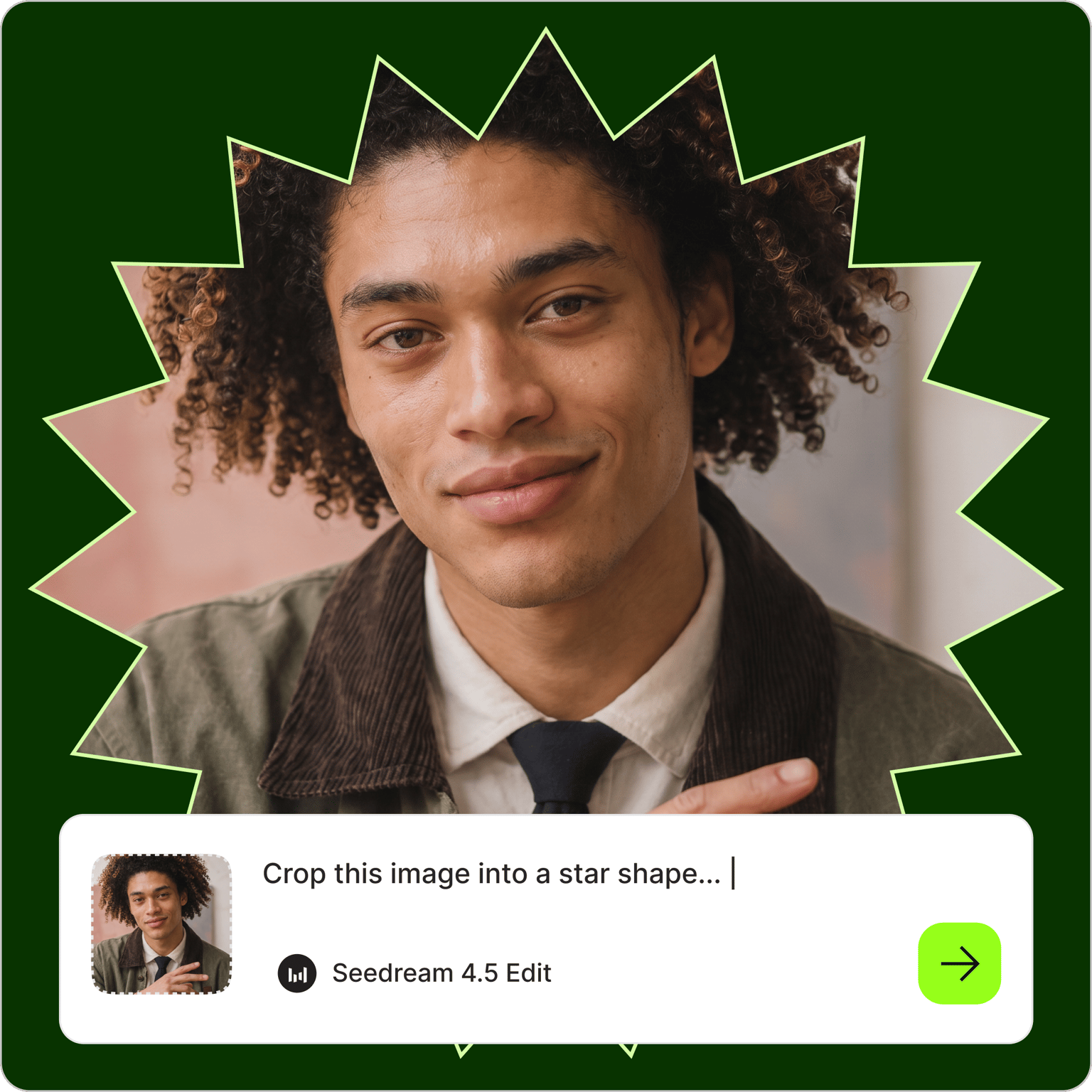
Any photo, cropped into any shape
Upload a photo, type the shape you want, and the image shape changer generates it. Ask for a circle, a heart, a hexagon, or an outline no preset covers, like a cloud or a speech bubble. Your subject stays inside the new edge, and you never drag a mask or a crop handle.
Creators use it for round profile pictures and podcast covers. Shop owners crop product shots into forms that fit sticker sheets and story highlight covers, and teachers turn class photos into hearts and stars for cards. If you have no picture yet, make one first with the AI image generator.
How to change the shape of an image:
Step 01
Upload your photo
Add the picture you want to reshape to the AI image editor. Clear, well-lit shots with the subject near the middle work best, because the new edge needs room around it. If the file is small, sharpen it first with the image upscaler.
Step 02
Describe the shape you want
Type the crop into the prompt field: "crop this photo into a circle on a white background," "cut this picture into a heart," or "crop it to a hexagon with a thin border." You can keep the default model or choose another to compare results.
Step 03
Download, vary, or animate
Save the result, or adjust the prompt and generate again until the look is right. The picture comes back on a solid background. For a transparent version to layer onto other designs, take the download to the AI background remover.
Learn More
Watch this Nano Banana Pro demo:
Crop an image into a circle or any custom shape
Circle crops are the most common request, so start there: a round headshot for a profile, or a round product photo for a label. The same prompt field handles ovals, hearts, stars, hexagons, and squares with rounded corners. It also takes irregular outlines that preset tools skip, like a paw print or the map of your state. Describe the form in a few words and the photo shape changer fits your picture inside it.
Cut out a shape from an image without masks or layers
Design software asks you to draw the outline, place the photo behind it, and line up a clipping mask. Here you write one sentence. Say where the subject should sit ("keep the face centered"), what goes around the cutout ("plain white background" or "pale blue backdrop"), and whether you want a border. The image shaper follows the instruction and returns a finished picture. A follow-up prompt can thicken the border or shift the crop.
Turn the cropped photo into a video overlay or intro
The finished crop has plenty of uses inside a video. Place a circular headshot in the corner of a tutorial as a presenter bubble, or open a reel with a heart-shaped photo of the couple. You can also animate it with image-to-video AI, then add captions and music in the video editor before you post.
FAQ
Upload the photo to the AI image editor, type what you want in the prompt field, and generate. For example, write "crop this photo into a circle on a white background." Then download the result, or change the prompt and run it again if you want a different outline or background color.
Describe the outline in plain words. The editor accepts common forms like hearts, stars, ovals, and hexagons, and it also handles irregular ones such as a cloud, a shield, or a puzzle piece. If the edge comes out too simple, add detail to the prompt, for example "a five-point star with rounded tips and a thin gold border."
No. This step returns your picture inside the cutout on a solid background, such as white or any color you name, and it does not export a transparent PNG. If you need transparency for layering, VEED's AI background remover is the separate tool for cutouts. A plain, high-contrast backdrop gives it a cleaner edge to work with.
Yes. Each crop runs on AI credits rather than a flat price. Credit cost changes with the AI model you pick and the number of outputs, and it appears before you generate. Paid plans include AI credits, and the VEED pricing page lists current plans and what each one includes.
Photos with one clear subject and some space around it work best. A tight close-up leaves little room for a round or pointed edge, so the crop may cut into hair or shoulders. Use a sharp, well-lit shot, keep the subject near the center, and mention in the prompt which part of the picture must stay visible.
Loved by creators.
Loved by the Fortune 500
“
With VEED I didn't need 15 tutorials - I jumped straight in and started editing.
Gwenne Wilcox
Founder,
Brand Brainery
“
You can go beyond choppping things. VEED actually makes my videos look great.
Michael Glover
Demand Gen Manager,
ConvertFlow
“
The first four videos i created with VEED got over 40,000 impressions on LinkedIn.

Travis Tyler
Senior Content Producer,
PandaDoc
“
I found VEED at the right time: if you're making UGC ads and not using Eye Contact Correction and Noise Reduction on VEED you're missing out on ROI.
Sebastian Schurgers
Head of Growth Marketing,
Gronda
“
With VEED I didn't need 15 tutorials - I jumped straight in and started editing.
Gwenne Wilcox
Founder,
Brand Brainery
“
You can go beyond choppping things. VEED actually makes my videos look great.
Michael Glover
Demand Gen Manager,
ConvertFlow
“
The first four videos i created with VEED got over 40,000 impressions on LinkedIn.
Travis Tyler
Senior Content Producer,
PandaDoc
“
I found VEED at the right time: if you're making UGC ads and not using Eye Contact Correction and Noise Reduction on VEED you're missing out on ROI.
Sebastian Schurgers
Head of Growth Marketing,
Gronda
“
The first four videos i created with VEED got over 40,000 impressions on LinkedIn.
Travis Tyler
Senior Content Producer,
PandaDoc
“
I found VEED at the right time: if you're making UGC ads and not using Eye Contact Correction and Noise Reduction on VEED you're missing out on ROI.
Sebastian Schurgers
Head of Growth Marketing,
Gronda
“
With VEED I didn't need 15 tutorials - I jumped straight in and started editing.
Gwenne Wilcox
Founder,
Brand Brainery
“
You can go beyond choppping things. VEED actually makes my videos look great.
Michael Glover
Demand Gen Manager,
ConvertFlow
Discover more
- Add Border to Image
- Add Jewelry to Photo
- Add Noise to Image
- Add Text to Photo
- AI Action Figure Generator
- AI Background Changer
- AI Blog Post Image Generator
- AI Business Card Generator
- AI Christmas Photo
- AI Clothes Changer
- AI Color Correction
- AI Coloring Page Generator
- AI Cosplay
- AI Doll Generator
- AI Embroidery Generator
- AI Expression Changer
- AI Face Editor
- AI Face Swap Photo
- AI Fairy
- AI Family Portrait
- AI Filter Remover
- AI Flyer Generator
- AI Ghostface Generator
- AI God Image Editor
- AI Greeting Card Generator
- AI Hair Color Changer
- AI Hairstyle Changer
- AI Image Combiner
- AI Image Variation Generator
- AI Leprechaun Generator
- AI LinkedIn Photo
- AI Magazine Cover Generator
- AI Makeup
- AI Mascot Generator
- AI Mask Generator
- AI Mugshot Generator
- AI NFT Generator
- AI Passport Photo
- AI Pet Portrait Generator
- AI Photo Restoration
- AI Pinup Generator
- AI Pose Changer
- AI Product Photography
- AI Renaissance Painting
- AI Replace
- AI Room Design
- AI Sculpture
- AI Shadow Remover
- AI Shoe Generator
- AI Smile Generator
- AI Snow
- AI Stencil Maker
- AI Time Machine
- AI Vintage Photo Generator
- AI Wedding Photo Generator
- AI Yourself
- Baby Face Generator
- Bald Filter
- Beard Filter
- Body Shape Editor
- Buzz Cut Filter
- Cartoon to Realistic AI
- Censor Image
- Change Color of Image
- Change Eye Color AI
- Color Palette Generator
- Face Cut Out
- Furry AI Generator
- Image Text Enhancer
- Lens Flare Effect
- Medal Generator
- Mirror Effect Photo
- Object Remover
- Old Filter
- Photo Angle Change AI
- Photo Date Editor
- Photo to Sketch
- Photo to Watercolor
- Pop Art Generator
- Relight Photo
- Sketch to Image AI
- Speech Bubble
- Stained Glass Generator
- Steampunk AI Generator
- Thanksgiving AI
- Tie Dye Generator
- Turn Photo into Line Drawing
More from VEED
Best AI Image Generators: Top Tools for Creating Stunning Visuals in 2026
From text prompts to breathtaking visuals in mere seconds, AI image generators have revolutionized the way we create digital art. Whether you're building content for social, school, or just for fun, turning ideas into visuals has never been easier. This guide breaks down the best AI image generators of 2025. You'll see what each tool does well, where it struggles, and who it’s built for, so you can pick the right one for your goals and budget.

AI Art Prompts: How to Write Better Prompts, Creative Examples, and Tools to Try
Getting your AI art prompts is the key to winning with generative AI tools. Learn how to write better prompts here.

How to Cartoonize Your Photo with AI (Step-by-Step Guide)
Learn how to cartoonize your photo using AI, and how to use ChatGPT to craft the perfect visual prompt to bring your unique style to life.
Trusted by 1M+ creators
When it comes to amazing videos, all you need is VEED
No credit card required
More than an image shape changer
Once the cropped photo looks right, the same picture can keep working for you. VEED is an AI video creation platform, so you can animate the picture with image-to-video AI or use it as a presenter bubble in your next tutorial. To build a full post around it, start a clip in the social media video maker and drop it in as an overlay. Start creating with VEED today.