


Trusted by 1M+ creators
Clean Audio API
Send a recording in any language and get clean speech back, ready for the next step in your app.
No credit card required
4.6
2,100+ reviews















Voice isolator API: Remove background noise from the speech your users upload
Speech recorded on laptops and phones usually picks up something in the background, like a fan, traffic, or music. Cleaning those files one at a time is not realistic for an app. A voice isolator API takes each recording and returns the speech without the background noise, so your product can clean every file automatically. The Clean Audio API is VEED's voice isolator API, and it gives the same results as Clean Audio on VEED.
Teams building AI video and voice apps use it to prepare speech for lip-sync, voice cloning, and dubbing. Podcast, video, and course platforms use it to clean up the recordings their users upload.
How to remove background noise with the Clean Audio API:
Step 01
Get your fal API key
The Clean Audio API runs on fal, so start by signing in to fal and creating an API key. Install the fal client for JavaScript or Python, or call the HTTP endpoint directly. If you want to hear the result before you write any code, run the model in fal's Playground on one of your own audio files.
Step 02
Send your recording
Pass the file as a public URL or a data URI. The API reads anything ffmpeg can open, so MP3, WAV, and M4A audio work as well as MP4, MOV, and WebM video. Each file can be up to 30 minutes long and up to 512 MB. Add strength, target_lufs, or output_format to the request when you want to change the defaults.
Step 03
Get the clean speech back
Requests run through fal's queue, so your app gets a request ID right away and can poll for the result or receive it by webhook. The result is the cleaned speech as a 48 kHz mono FLAC file, or as a WAV file if you asked for one. If you started from a video, add the clean track back into it in your own pipeline.
Learn More
Watch the Clean Audio API clean up a noisy recording:
Give lip-sync and voice cloning models the clean speech they ask for
Lip-sync and voice cloning services ask for speech without background noise or music, because what is in the recording tends to carry into the result. The Clean Audio API removes the noise, music, and sound effects behind the voice, so the next model gets clean speech to work with. If you already use fal for VEED's Lip Sync API or other models, this is one more call on the same account, not another vendor to set up.
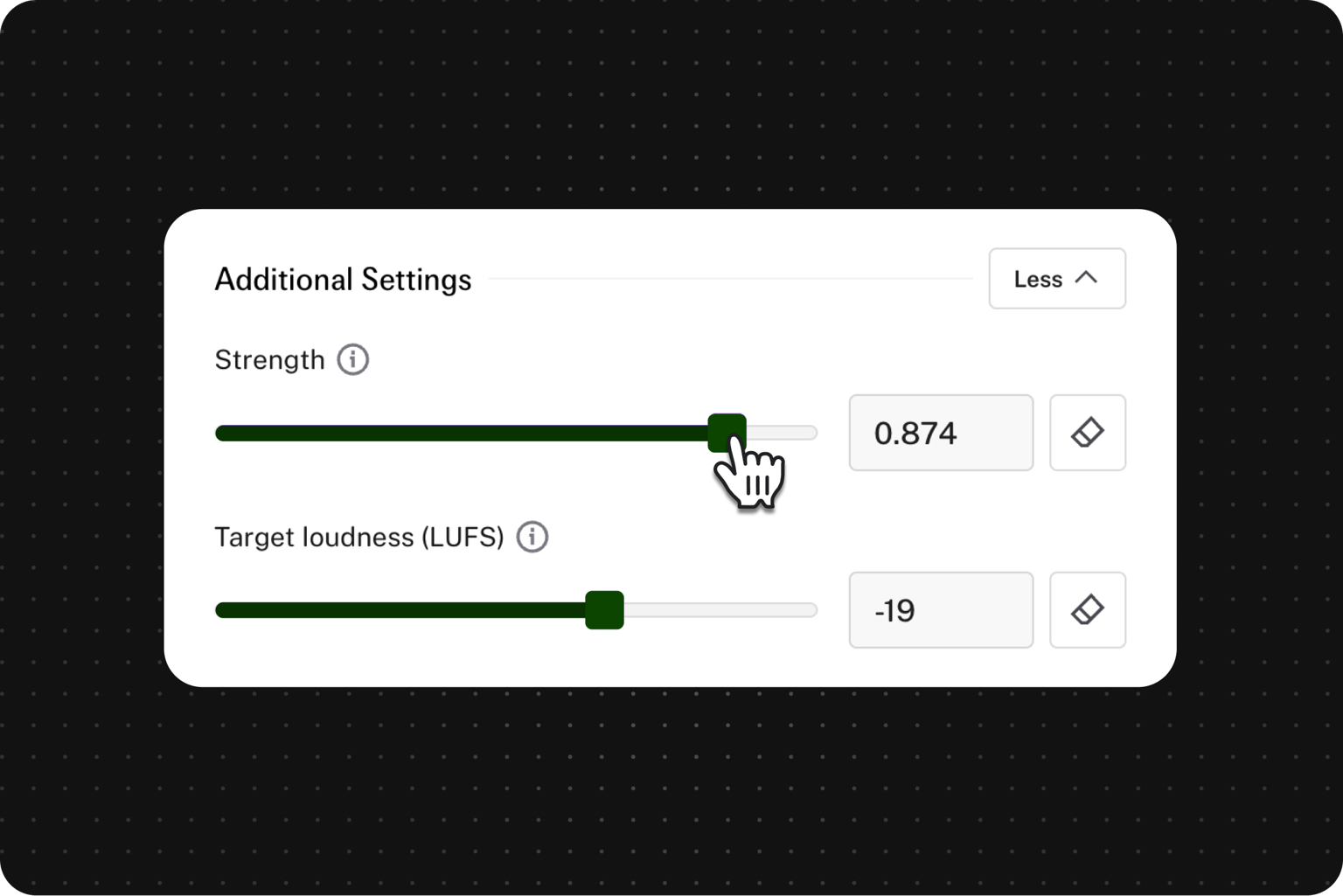
Choose how much noise to remove and how loud the result should be
Heavy-handed noise removal can make voices sound thin or robotic, and on a platform that cleans every upload, users notice. The strength parameter sets how far the background noise is turned down, so you can keep a little of the room's natural sound or remove more of it. In the same request, target_lufs brings every file to the same loudness, and its default of -19 LUFS is a common target for mono speech.
Clean speech at volume without running your own denoising setup
Cleaning voice samples or a whole archive of recordings adds up quickly, and hosting a model yourself means GPUs to manage. The Clean Audio API costs $0.0125 per minute of audio, which works out to $0.75 an hour. Per minute, that is a fraction of what the other speech cleanup models on fal charge, and there is no subscription. Each request is rounded up to the next whole minute, with a one-minute minimum.
FAQ
A voice isolator API, also called a background noise removal API, uses AI to take a recording and return just the speech, with the background noise removed. Apps call it to clean files automatically instead of editing each one by hand. It is not a vocal remover for separating singing from music, and it is not real-time noise suppression for live calls. VEED's Clean Audio API does this for recorded speech in any language.
Send the recording to a noise removal API and get a cleaned file back. With the Clean Audio API, you create a fal API key and send the file as a public URL or data URI through the JavaScript or Python client. The result comes back through fal's queue, or to a webhook if you set one. If you only need an AI audio cleaner for one file, you can use the remove background tool.
Speech cleanup APIs are usually billed by the amount of audio you send. The Clean Audio API costs $0.0125 per minute through fal, and each request is rounded up to the next whole minute, with a one-minute minimum. So a 10-second clip costs $0.0125 and a 61-second clip costs $0.025. A 10-minute file costs $0.125, and an hour of audio costs $0.75. Running it in fal's Playground uses your fal credits too.
Yes. The model is built for speech, so it treats music and sound effects as background noise and removes them together with the rest of the noise behind the voice. It is not designed to separate vocals from a song, and it does not return the music as a separate track. If you need the music later, keep the original file. Without code, you can clean up a video's audio.
Yes. You can send MP4, MOV, or WebM video, or any other format ffmpeg can read, up to 30 minutes and 512 MB per file. The API cleans the video's audio track and returns the speech as a mono FLAC or WAV file rather than a new video. The file has the same duration as your input, so you can add it back to the original video in your own pipeline, for example with ffmpeg.
No. It is built for recorded files rather than live calls. Processing takes about 0.2 to 0.5 times the length of the audio, plus about a minute to start up. A 10-minute file usually comes back in about 3 to 6 minutes. That is why it works best through fal's queue with a webhook. For live calls and meetings, use a real-time noise suppression tool instead.
Usually not. Many speech-to-text providers recommend sending them the original recording, because noise removal can strip out detail their models use and make transcripts less accurate. Use the cleaned file for what people listen to and for models that ask for clean speech, such as lip-sync and voice cloning. If you want to transcribe the cleaned version too, compare the results from both versions first.
Loved by creators.
Loved by the Fortune 500
“
With VEED I didn't need 15 tutorials - I jumped straight in and started editing.

Gwenne Wilcox
Founder,
Brand Brainery
“
You can go beyond choppping things. VEED actually makes my videos look great.

Michael Glover
Demand Gen Manager,
ConvertFlow
“
The first four videos i created with VEED got over 40,000 impressions on LinkedIn.

Travis Tyler
Senior Content Producer,
PandaDoc
“
I found VEED at the right time: if you're making UGC ads and not using Eye Contact Correction and Noise Reduction on VEED you're missing out on ROI.

Sebastian Schurgers
Head of Growth Marketing,
Gronda
“
With VEED I didn't need 15 tutorials - I jumped straight in and started editing.
Gwenne Wilcox
Founder,
Brand Brainery
“
You can go beyond choppping things. VEED actually makes my videos look great.
Michael Glover
Demand Gen Manager,
ConvertFlow
“
The first four videos i created with VEED got over 40,000 impressions on LinkedIn.
Travis Tyler
Senior Content Producer,
PandaDoc
“
I found VEED at the right time: if you're making UGC ads and not using Eye Contact Correction and Noise Reduction on VEED you're missing out on ROI.
Sebastian Schurgers
Head of Growth Marketing,
Gronda
“
The first four videos i created with VEED got over 40,000 impressions on LinkedIn.
Travis Tyler
Senior Content Producer,
PandaDoc
“
I found VEED at the right time: if you're making UGC ads and not using Eye Contact Correction and Noise Reduction on VEED you're missing out on ROI.
Sebastian Schurgers
Head of Growth Marketing,
Gronda
“
With VEED I didn't need 15 tutorials - I jumped straight in and started editing.
Gwenne Wilcox
Founder,
Brand Brainery
“
You can go beyond choppping things. VEED actually makes my videos look great.
Michael Glover
Demand Gen Manager,
ConvertFlow
Explore related tools
More from VEED
Top 5 Best Music Visualizers [Free and Paid]
Here are some of the best music visualizers available on the internet and how to use them!

How to Add Music to an Instagram Post, Reel, or Story in 2026
Adding music to your Instagram content makes the video much more interactive and engaging while building retention among viewers. Here's how to do it for any Instagram post format.

11 Easy Ways to Add Music to Video [Step-By-Step Guide] in 2026
Not sure where to find music for video whether free or paid? Want to learn how to find it, pick the right song, and then add it to your video content? Then dig in!
Trusted by 1M+ creators
When it comes to amazing videos, all you need is VEED
No credit card required
More than a voice isolator API
Clean Audio is one of several VEED models you can call on fal. VEED is an AI video creation platform, and its developer APIs let you add video features to your own product. You can burn styled captions into a video with the Subtitles API or remove a video's background with the Background Remover API. Fabric 1.0 turns a photo and a voice track into a talking video. If your app turns user recordings into talking videos, clean the voice with Clean Audio first and then send it to Fabric 1.0 with the photo.