


Trusted by 1M+ creators
White Background Editor
Add white background to photo online
No credit card required
4.6
2,100+ reviews















Make background white for product photos and portraits
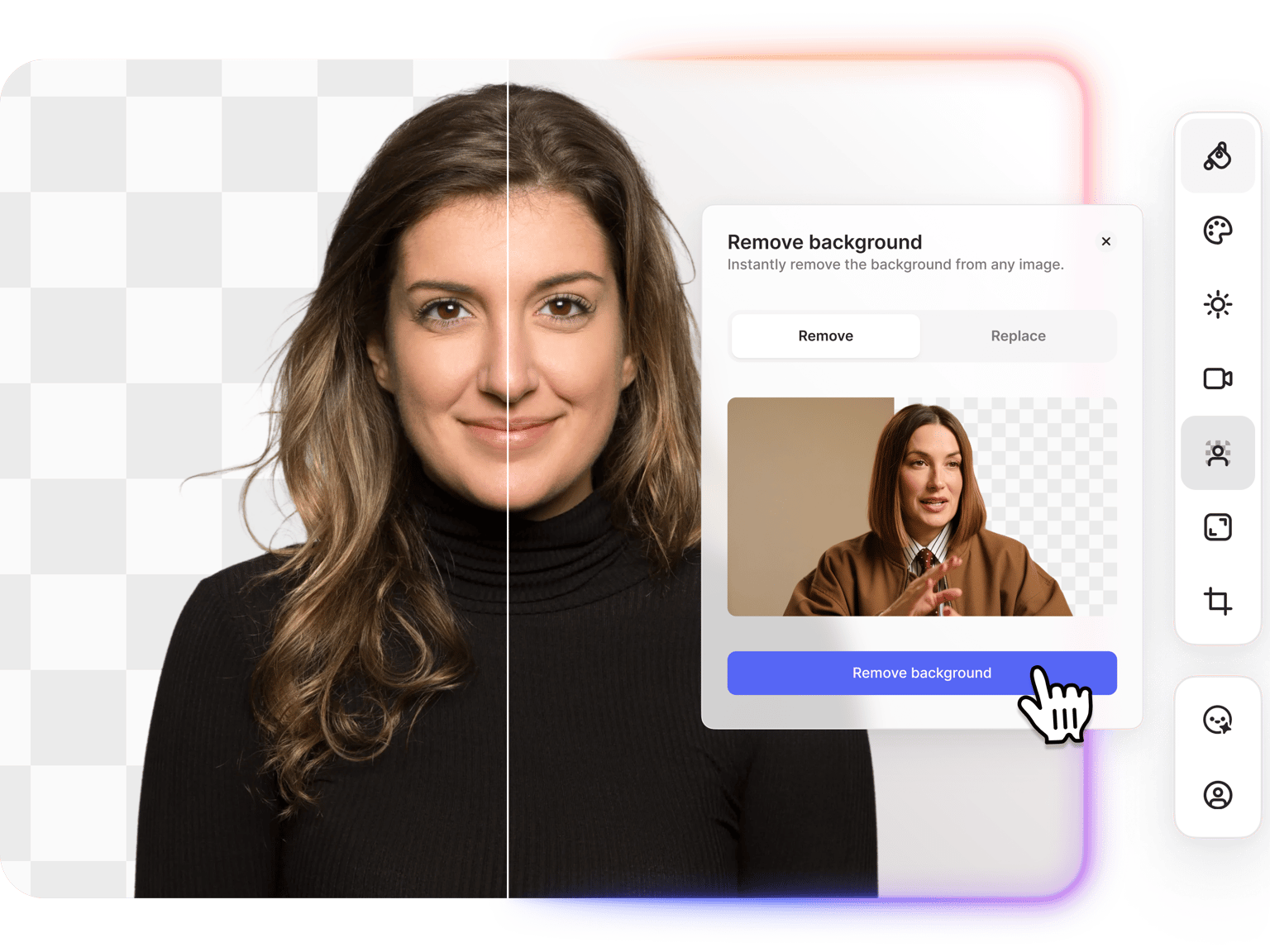
Need a clean white background for your images? VEED's white background editor removes existing backgrounds and replaces them with white in seconds. Upload product photos for e-commerce listings, headshots for professional profiles, or passport photos that need white backgrounds. The AI handles edges cleanly, even around hair and fine details. Change background to white, download, and use anywhere.
How to add white background to photo:
Step 01
Upload your image
Upload the photo you want to edit. Works with product shots, portraits, graphics, and any image where you need a white background. You can upscale low-resolution images first for better quality.
Step 02
Remove and replace background
Click 'Remove background' then select Replace. Type a prompt like, “replace background with white.” The AI removes the existing background and adds white behind your subject.
Step 03
Download your image
Save your image with the new white background. Ready for e-commerce platforms, professional profiles, documents, or print materials.
Learn More
Also check out our video background remover:
Clean product photos for e-commerce listings
Create product photos with white backgrounds for Amazon, eBay, Shopify, and other e-commerce platforms. White backgrounds are the standard for online listings. They look professional and keep focus on your product. Upload your product shot, remove the existing background, replace it with white, and download. Build a consistent catalog with clean white backgrounds.
White background for passport photos and headshots
Add a white background to portraits for passport photos, ID photos, and professional headshots. Many passport applications require white or light-colored backgrounds. Corporate headshots and LinkedIn photos also look cleaner on white. Upload your portrait, swap the background to white, and download your photo. Clean edges around hair and shoulders, no manual editing needed.
Change black background to white
Have images stuck on black backgrounds? Change a black background to white without losing the dark elements in your subject. Works for logos exported on dark backgrounds, gaming graphics, screenshots from video editing software, and digital artwork. The AI works to separate your subject from the background, helping preserve black clothing, text, or design elements while the background swaps to white.
FAQ
- Upload your image to VEED's white background editor.
- Click 'Remove background,' then select Replace. Type a prompt like "change background to white." The AI removes the existing background and replaces it with white.
- Download your edited image. Ready for e-commerce listings, professional profiles, or documents.
- Upload your image with the black background.
- Click 'Remove background' and select Replace. Type a prompt to change the black background to white.
- The AI separates your subject from the black background and swaps it to white. The AI works to keep dark elements in your actual image (black text, clothing, design details) intact.
Yes. This tool works both ways. You can add a white background to photos, or remove an existing white background. To remove white backgrounds, click 'Remove background' and select Remove. Download the image as PNG with transparency. Works for logos, graphics, and product images where you need to strip the white background out.
To remove a white background from an image, upload it to VEED and click 'Remove background,' then select Remove (not Replace). The AI erases the white background, and you download the image as a PNG with transparency. Works for logos, graphics, and any image where you need to get rid of the white background.
VEED uses a credit-based system for AI image editing. Background removal and replacement costs credits per image. You get access to the white background maker, AI background replacement, transparent PNG exports, and the option to bring images into video projects. Check our pricing page for current plans.
Loved by creators.
Loved by the Fortune 500
“
With VEED I didn't need 15 tutorials - I jumped straight in and started editing.

Gwenne Wilcox
Founder,
Brand Brainery
“
You can go beyond choppping things. VEED actually makes my videos look great.

Michael Glover
Demand Gen Manager,
ConvertFlow
“
The first four videos i created with VEED got over 40,000 impressions on LinkedIn.

Travis Tyler
Senior Content Producer,
PandaDoc
“
I found VEED at the right time: if you're making UGC ads and not using Eye Contact Correction and Noise Reduction on VEED you're missing out on ROI.

Sebastian Schurgers
Head of Growth Marketing,
Gronda
“
With VEED I didn't need 15 tutorials - I jumped straight in and started editing.
Gwenne Wilcox
Founder,
Brand Brainery
“
You can go beyond choppping things. VEED actually makes my videos look great.
Michael Glover
Demand Gen Manager,
ConvertFlow
“
The first four videos i created with VEED got over 40,000 impressions on LinkedIn.
Travis Tyler
Senior Content Producer,
PandaDoc
“
I found VEED at the right time: if you're making UGC ads and not using Eye Contact Correction and Noise Reduction on VEED you're missing out on ROI.
Sebastian Schurgers
Head of Growth Marketing,
Gronda
“
The first four videos i created with VEED got over 40,000 impressions on LinkedIn.
Travis Tyler
Senior Content Producer,
PandaDoc
“
I found VEED at the right time: if you're making UGC ads and not using Eye Contact Correction and Noise Reduction on VEED you're missing out on ROI.
Sebastian Schurgers
Head of Growth Marketing,
Gronda
“
With VEED I didn't need 15 tutorials - I jumped straight in and started editing.
Gwenne Wilcox
Founder,
Brand Brainery
“
You can go beyond choppping things. VEED actually makes my videos look great.
Michael Glover
Demand Gen Manager,
ConvertFlow
Discover more
More from VEED
Best AI Image Generators: Top Tools for Creating Stunning Visuals in 2026
From text prompts to breathtaking visuals in mere seconds, AI image generators have revolutionized the way we create digital art. Whether you're building content for social, school, or just for fun, turning ideas into visuals has never been easier. This guide breaks down the best AI image generators of 2025. You'll see what each tool does well, where it struggles, and who it’s built for, so you can pick the right one for your goals and budget.

AI Art Prompts: How to Write Better Prompts, Creative Examples, and Tools to Try
Getting your AI art prompts is the key to winning with generative AI tools. Learn how to write better prompts here.

How to Cartoonize Your Photo with AI (Step-by-Step Guide)
Learn how to cartoonize your photo using AI, and how to use ChatGPT to craft the perfect visual prompt to bring your unique style to life.
Trusted by 1M+ creators
When it comes to amazing videos, all you need is VEED
No credit card required
More than a white background maker
VEED gives you a complete image and video editing workspace. Add white backgrounds to product photos, then drop them into e-commerce videos for social ads and listings. Need to remove backgrounds from video footage? Use our video background remover for talking heads and product demos. Edit images, create videos, add subtitles, and export for any platform. All in one place.