


Trusted by 1M+ creators
Face Cut Out
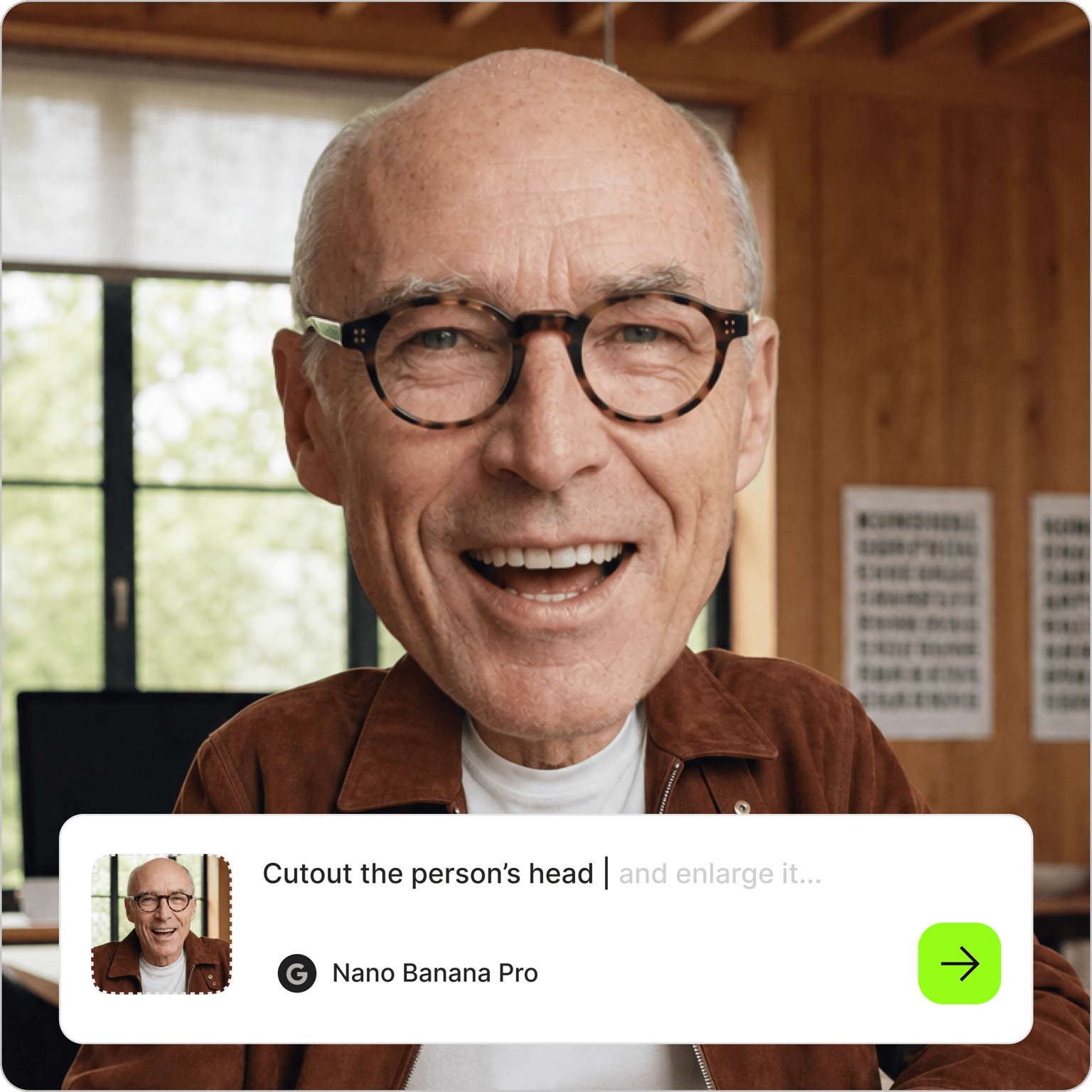
Cut any face or head out of a photo by typing what you want to keep
No credit card required
4.6
2,100+ reviews















Pull one face or a whole head out of any photo
Upload a photo, type which face you want kept and how much of it, and VEED's face cut out tool isolates it. Ask for a tight crop, the full head with hair, or one person out of a group shot. Switching AI models is optional.
People use it for oversized head props at a graduation or a game, stickers and reaction images, a profile picture, or a head to drop onto a birthday card. If the shot needs a fix first, change the expression or tidy the skin with the AI face editor in the same session.
How to cut out a face:
Step 01
Upload your photo
Drop in a photo where the face is clear and well lit. Group shots work too, as long as the person you want is not blocked. If the face is small in the frame, sharpen the source first with the image upscaler.
Step 02
Describe the cutout you want
Type what to keep into the prompt field: "just the face on a plain white background," "keep the whole head and hair, remove the rest," or "only the person on the left." Keep the default model or pick another to compare results.
Step 03
Download, vary, or animate
Save the result, or re-prompt until it matches what you had in mind. For a transparent PNG you can layer onto anything, run it through the AI background remover. To put the head in motion, animate it with image-to-video AI.
Learn More
Watch this Nano Banana Pro demo:
Describe the face cutout instead of tracing it
The edge goes where you say it goes. In VEED's AI image editor you type the decision: how tight the crop is and whether every strand of hair comes along. Name the person, like "the man in the gray hoodie," and the editor leaves the rest of the group behind. There is no lasso or brush step and no cleanup pass around the ears, so a usable result takes about as long as writing the sentence.
Print it as a big head cut out or shrink it to a sticker
One cutout covers every size you need. Printed at poster size on foam board, a big head cut out gets held up at graduations and waved from the bleachers at a game. The same file shrinks down to a sticker or a profile picture with a clean edge. Once the background is gone, which the AI background remover handles, the head sits on a birthday card or a thumbnail without a box around it.
Turn the cutout into a talking clip
The cutout is a good starting frame for video. Upload the cutout to Fabric 1.0 with an audio clip, and the mouth and expression move with the words, which turns a birthday head into a birthday message. Or animate the image to send the head bobbing across the frame. Either result can go into the video editor, where you add captions and music before the post goes out.
FAQ
Upload the picture, describe what to keep in the prompt field, for example "cut out the face and put it on a white background," and generate. That is the whole process in VEED's AI image editor, with no selection tools. For a transparent background, run the result through the AI background remover afterward.
Yes. A head cutout keeps the hair, ears, and neck, which is what you want for a big head prop or a sticker. A tighter cutout trims in close around the features, which suits a small round avatar or a collage. You choose by writing it in the prompt, and VEED's editor follows the instruction without a mask or an eraser.
A one-click tool runs one automatic selection and hands you whatever edge it found. VEED's editor works from a written instruction, so you decide how much of the head stays and which person in a group photo gets isolated. The AI keeps the features and lighting from your photo, so the cutout still looks like the real person.
Every cutout you generate in VEED runs on AI credits. The cost depends on which AI model you use and how many results you generate, and the number of credits shows on screen before you run the prompt. Paid plans come with a set amount of credits that varies by plan; the VEED pricing page lists what each one includes.
Isolate the head from a clear photo, make it transparent with the AI background remover, and sharpen it with the image upscaler so it prints clean at poster size. Print on card stock or foam board, trim around the edge, and tape a paint stirrer or a dowel to the back. A head printed larger than life reads well from across a room.
Loved by creators.
Loved by the Fortune 500
“
With VEED I didn't need 15 tutorials - I jumped straight in and started editing.

Gwenne Wilcox
Founder,
Brand Brainery
“
You can go beyond choppping things. VEED actually makes my videos look great.

Michael Glover
Demand Gen Manager,
ConvertFlow
“
The first four videos i created with VEED got over 40,000 impressions on LinkedIn.

Travis Tyler
Senior Content Producer,
PandaDoc
“
I found VEED at the right time: if you're making UGC ads and not using Eye Contact Correction and Noise Reduction on VEED you're missing out on ROI.

Sebastian Schurgers
Head of Growth Marketing,
Gronda
“
With VEED I didn't need 15 tutorials - I jumped straight in and started editing.
Gwenne Wilcox
Founder,
Brand Brainery
“
You can go beyond choppping things. VEED actually makes my videos look great.
Michael Glover
Demand Gen Manager,
ConvertFlow
“
The first four videos i created with VEED got over 40,000 impressions on LinkedIn.
Travis Tyler
Senior Content Producer,
PandaDoc
“
I found VEED at the right time: if you're making UGC ads and not using Eye Contact Correction and Noise Reduction on VEED you're missing out on ROI.
Sebastian Schurgers
Head of Growth Marketing,
Gronda
“
The first four videos i created with VEED got over 40,000 impressions on LinkedIn.
Travis Tyler
Senior Content Producer,
PandaDoc
“
I found VEED at the right time: if you're making UGC ads and not using Eye Contact Correction and Noise Reduction on VEED you're missing out on ROI.
Sebastian Schurgers
Head of Growth Marketing,
Gronda
“
With VEED I didn't need 15 tutorials - I jumped straight in and started editing.
Gwenne Wilcox
Founder,
Brand Brainery
“
You can go beyond choppping things. VEED actually makes my videos look great.
Michael Glover
Demand Gen Manager,
ConvertFlow
Discover more
More from VEED
Best AI Image Generators: Top Tools for Creating Stunning Visuals in 2026
From text prompts to breathtaking visuals in mere seconds, AI image generators have revolutionized the way we create digital art. Whether you're building content for social, school, or just for fun, turning ideas into visuals has never been easier. This guide breaks down the best AI image generators of 2025. You'll see what each tool does well, where it struggles, and who it’s built for, so you can pick the right one for your goals and budget.

AI Art Prompts: How to Write Better Prompts, Creative Examples, and Tools to Try
Getting your AI art prompts is the key to winning with generative AI tools. Learn how to write better prompts here.

How to Cartoonize Your Photo with AI (Step-by-Step Guide)
Learn how to cartoonize your photo using AI, and how to use ChatGPT to craft the perfect visual prompt to bring your unique style to life.
Trusted by 1M+ creators
When it comes to amazing videos, all you need is VEED
No credit card required
More than a face cut out tool
Pulling a head out of a photo is one of many things you can do with a single upload. VEED is an AI video creation platform, so the head you just isolated can keep going: make it talk with Fabric 1.0, or animate it with image-to-video AI for a quick reaction clip. To build the post around it, bring the cutout into the video editor and add captions and music. Start creating with VEED today.